2026传智杯国赛-操作系统大赛

基础配置

系统环境配置

IP地址配置

1
2
###  编辑网卡配置文件
[root@Kylin-Server-01 ~]# vim /etc/sysconfig/network-scripts/ifcfg-ens33

ifcfg-ens33 配置文件内容:

1
2
3
4
5
6
7
8
9
10
11
12
13
14
15
16
17
18
19
TYPE=Ethernet
PROXY_METHOD=none
BROWSER_ONLY=no
BOOTPROTO=static
DEFROUTE=yes
IPV4_FAILURE_FATAL=no
IPV6INIT=yes
IPV6_AUTOCONF=yes
IPV6_DEFROUTE=yes
IPV6_FAILURE_FATAL=no
IPV6_ADDR_GEN_MODE=stable-privacy
NAME=ens33
UUID=95e7e05c-de2a-4771-93df-92c18a197af1
DEVICE=ens33
ONBOOT=no
IPADDR=192.168.44.129
NETMASK=255.255.255.0
GATEWAY=192.168.44.2
DNS=8.8.8.8

配置DNS(为后面网络源铺垫)

1
2
3
4
[sysadmin@Kylin-Server-01 ~]$ vim /etc/resolv.conf 
[sysadmin@Kylin-Server-01 ~]$ cat /etc/resolv.conf
#### Generated by NetworkManager
nameserver 114.114.114.114

网络服务重启与验证:

1
2
3
4
5
6
7
8
[root@Kylin-Server-01 ~]# /etc/init.d/network restart
[root@Kylin-Server-01 ~]# ifup ens33
[root@Kylin-Server-01 ~]# ping 192.168.44.130
PING 192.168.44.11 (192.168.44.11) 56(84) bytes of data.
64 bytes from 192.168.44.11: icmp_seq=1 ttl=64 time=0.263 ms
64 bytes from 192.168.44.11: icmp_seq=2 ttl=64 time=0.230 ms
--- 192.168.44.11 ping statistics ---
2 packets transmitted, 2 received, 0% packet loss, time 1034ms

防火墙配置

防火墙策略配置:

1
2
3
4
5
6
7
8
9
10
11
12
13
14
15
16
17
18
19
20
21
22
23
24
25
26
####  设置默认策略为拒绝
[root@Kylin-Server-01 ~]# firewall-cmd --permanent --set-target=DROP
success

#### 添加必需服务
[root@Kylin-Server-01 ~]# firewall-cmd --permanent --add-service=ssh
Warning: ALREADY_ENABLED: ssh
success

[root@Kylin-Server-01 ~]# firewall-cmd --permanent --add-service=http
success

[root@Kylin-Server-01 ~]# firewall-cmd --permanent --add-service=https
success

[root@Kylin-Server-01 ~]# firewall-cmd --permanent --add-service=nfs
success

[root@Kylin-Server-01 bin]# firewall-cmd --permanent --add-port=5236/tcp
success

[root@Kylin-Server-01 bin]# firewall-cmd --permanent --add-port=5000/tcp
success

[root@Kylin-Server-01 ~]# firewall-cmd --reload
success

初始防火墙状态:

1
2
3
4
5
6
7
8
9
10
11
12
13
14
[root@Kylin-Server-01 ~]# firewall-cmd --list-all
public (active)
target: DROP
icmp-block-inversion: no
interfaces: ens33
sources:
services: cockpit dhcpv6-client http https mdns nfs ssh
ports: 5000 5236
protocols:
masquerade: no
forward-ports:
source-ports:
icmp-blocks:
rich rules:

移除不必要服务:

1
2
3
4
5
6
7
8
9
10
11
[root@Kylin-Server-01 ~]# firewall-cmd --permanent --remove-service=cockpit
success

[root@Kylin-Server-01 ~]# firewall-cmd --permanent --remove-service=dhcpv6-client
success

[root@Kylin-Server-01 ~]# firewall-cmd --permanent --remove-service=mdns
success

[root@Kylin-Server-01 ~]# firewall-cmd --reload
success

最终防火墙状态:

1
2
3
4
5
6
7
8
9
10
11
12
13
14
[root@Kylin-Server-01 ~]# firewall-cmd --list-all
public (active)
target: DROP
icmp-block-inversion: no
interfaces: ens33
sources:
services: http https nfs ssh
ports: 5000 5236
protocols:
masquerade: no
forward-ports:
source-ports:
icmp-blocks:
rich rules:

无用服务管理

1
2
3
4
5
6
7
8
9
10
#### 禁用 CUPS 打印服务
[root@Kylin-Server-01 ~]# systemctl disable cups
Removed /etc/systemd/system/multi-user.target.wants/cups.path.
Removed /etc/systemd/system/sockets.target.wants/cups.socket.
Removed /etc/systemd/system/printer.target.wants/cups.service.

#### 禁用蓝牙服务
[root@Kylin-Server-01 ~]# systemctl disable bluetooth
Removed /etc/systemd/system/dbus-org.bluez.service.
Removed /etc/systemd/system/bluetooth.target.wants/bluetooth.service.

系统环境优化

时间同步配置

修改 chrony 配置文件:

1
[root@Kylin-Server-01 ~]# vim /etc/chrony.conf

chrony.conf 配置内容:

1
2
3
4
5
6
#### Use public servers from the pool.ntp.org project.
#### Please consider joining the pool (http://www.pool.ntp.org/join.html).
#pool pool.ntp.org iburst
server ntp.ntsc.ac.cn iburst
server ntp1.aliyun.com iburst
#server cn.pool.ntp.org iburst

启动并启用 chrony 服务:

1
2
3
[root@Kylin-Server-01 ~]# systemctl restart chronyd
[root@Kylin-Server-01 ~]# systemctl enable chronyd
Created symlink /etc/systemd/system/multi-user.target.wants/chronyd.service → /usr/lib/systemd/system/chronyd.service.

时间同步状态检查:

1
2
3
4
5
6
7
8
9
10
11
12
13
[root@Kylin-Server-01 ~]# chronyc sources -v
210 Number of sources = 0

.-- Source mode '^' = server, '=' = peer, '#' = local clock.
/ .- Source state '*' = current synced, '+' = combined , '-' = not combined,
| / '?' = unreachable, 'x' = time may be in error, '~' = time too variable.
|| .- xxxx [ yyyy ] +/- zzzz
|| Reachability register (octal) -. | xxxx = adjusted offset,
|| Log2(Polling interval) --. | | yyyy = measured offset,
|| \ | | zzzz = estimated error.
|| | | \
MS Name/IP address Stratum Poll Reach LastRx Last sample
===============================================================================
1
2
3
4
5
6
7
8
9
10
11
12
13
14
[root@Kylin-Server-01 ~]# chronyc tracking 
Reference ID : 00000000 ()
Stratum : 0
Ref time (UTC) : Thu Jan 01 00:00:00 1970
System time : 0.000000000 seconds slow of NTP time
Last offset : +0.000000000 seconds
RMS offset : 0.000000000 seconds
Frequency : 1.496 ppm slow
Residual freq : +0.000 ppm
Skew : 0.000 ppm
Root delay : 1.000000000 seconds
Root dispersion : 1.000000000 seconds
Update interval : 0.0 seconds
Leap status : Not synchronised
1
2
3
4
5
6
7
8
[root@Kylin-Server-01 ~]# timedatectl status
Local time: 三 2026-05-20 15:46:12 CST
Universal time: 三 2026-05-20 07:46:12 UTC
RTC time: 三 2026-05-20 07:46:12
Time zone: Asia/Shanghai (CST, +0800)
System clock synchronized: no
NTP service: active
RTC in local TZ: no

合理划分存储分区(需满⾜数据库、备份、应⽤存储需求)

1
2
3
4
5
6
7
8
9
10
[root@Kylin-Server-01 ~]# df -h
文件系统 容量 已用 可用 已用% 挂载点
devtmpfs 1.4G 0 1.4G 0% /dev
tmpfs 1.5G 4.0K 1.5G 1% /dev/shm
tmpfs 1.5G 9.7M 1.4G 1% /run
tmpfs 1.5G 0 1.5G 0% /sys/fs/cgroup
/dev/mapper/klas-root 37G 8.0G 29G 22% /
tmpfs 1.5G 215M 1.2G 15% /tmp
/dev/sda1 1014M 212M 803M 21% /boot
tmpfs 288M 48K 288M 1% /run/user/0

创建专⽤管理⽤⼾(系统、数据库、WEB服务分别对应专⽤⽤⼾),分配合理权限

1
2
3
4
5
6
7
8
9
10
11
12
13
14
15
16
17
18
19
20
21
22
23
24
25
26
27
28
29
30
31
32
33
34
[root@Kylin-Server-01 ~]# groupadd sysadmin
[root@Kylin-Server-01 ~]# useradd -m -g sysadmin -G wheel -s /bin/bash sysadmin
[root@Kylin-Server-01 ~]# passwd sysadmin
更改用户 sysadmin 的密码 。
新的密码:
重新输入新的密码:
passwd:所有的身份验证令牌已经成功更新。

[root@Kylin-Server-01 ~]# groupadd dmadmin
[root@Kylin-Server-01 ~]# useradd -m -g dmadmin -s /bin/bash dmadmin
[root@Kylin-Server-01 ~]# passwd dmadmin
更改用户 dmadmin 的密码 。
新的密码:
重新输入新的密码:
passwd:所有的身份验证令牌已经成功更新。

[root@Kylin-Server-01 ~]# groupadd webapp
[root@Kylin-Server-01 ~]# useradd -m -g webapp -s /sbin/nologin webadmin
[root@Kylin-Server-01 ~]# passwd webadmin
更改用户 webadmin 的密码 。
新的密码:
重新输入新的密码:
passwd:所有的身份验证令牌已经成功更新。
[root@Kylin-Server-01 ~]# useradd -r -s /sbin/nologin appuser

[root@Kylin-Server-01 ~]# mkdir -p /app /data/dmdb /data/backup /var/log/app
[root@Kylin-Server-01 ~]# chown -R appuser:webadmin /app
[root@Kylin-Server-01 ~]# chown -R dmadmin:dmadmin /data/dmdb
[root@Kylin-Server-01 ~]# chown -R dmadmin:sysadmin /data/backup
[root@Kylin-Server-01 ~]# chown -R appuser:webadmin /var/log/app
[root@Kylin-Server-01 ~]# chmod 2750 /app
[root@Kylin-Server-01 ~]# chmod 2700 /data/dmdb/
[root@Kylin-Server-01 ~]# chmod 2770 /data/backup/
[root@Kylin-Server-01 ~]# chmod 2750 /var/log/app/

达梦基础

安装准备

创建dmdba用户并合理分配组

1
2
3
groupadd dinstall -g 2001
useradd -G dinstall -m -d /home/dmdba -s /bin/bash -u 2001 dmdba
passwd dmdba

修改文件打开最大数

使用root用户打开/etc/security/limits.conf文件进行修改

1
2
3
4
5
6
7
8
9
10
11
12
13
14
15
16
vi /etc/security/limits.conf
在最后添加下面配置
dmdba soft nice 0
dmdba hard nice 0
dmdba soft as unlimited
dmdba hard as unlimited
dmdba soft fsize unlimited
dmdba hard fsize unlimited
dmdba soft nproc 65536
dmdba hard nproc 65536
dmdba soft nofile 65536
dmdba hard nofile 65536
dmdba soft core unlimited
dmdba hard core unlimited
dmdba soft data unlimited
dmdba hard data unlimited

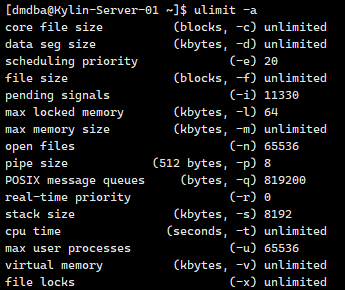
切换到dmdba查看生效是否

1
2
su - dmdba
ulimit -a

image-20260526103856863

目录规划分为实例保存目录、归档保存目录、备份保存目录

1
2
3
4
5
6
// 实例保存目录
mkdir -p /dmdata/data
// 归档保存目录
mkdir -p /dmdata/arch
// 备份保存目录
mkdir -p /dmdata/dmbak

修改目录权限

1
2
3
4
5
6
7
8
9
chown -R dmdba:dinstall /dmdata/data
chown -R dmdba:dinstall /dmdata/arch
chown -R dmdba:dinstall /dmdata/dmbak
chmod -R 755 /dmdata/data
chmod -R 755 /dmdata/arch
chmod -R 755 /dmdata/dmbak

[root@Kylin-Server-02 dmdba]# mkdir /home/dmdba/dmdbms
[root@Kylin-Server-02 dmdba]# chown -R dmdba:dinstall /home/dmdba/dmdbms

开始安装

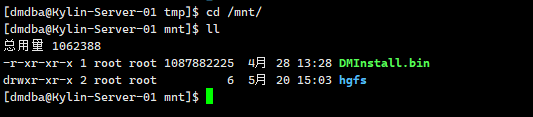
在达梦官网下载DM8的镜像文件通过WinSCP拷入KylinOS中,存放到/opt目录下,挂载到/mnt上:

1
2
cd /opt
mount -o loop dm8_20260428_x86_kylin10_sp3_64.iso /mnt

image-20260526104510176

挂载之后应该是一个bin的文件与一个PDF文件,此处可以运行DMInstall.bin

1
2
3
4
5
6
./DMInstall.bin		// 这里不少人会报错,报错提示硬盘不够,优先使用df -h来进行查看你安装的地方位置是否够
// 如果不够考虑如下办法,手动设置安装路径
export TMPDIR=/opt/tmp
mkdir -p $TMPDIR
./DMInstall.bin -i
// 开始安装之后根据需要选择安装方式即可

安装完成之后切换root用户执行命令/home/dmdba/dmdbms/script/root/root_installer.sh(此处的路径位置根据你安装的时候选择的位置来)

image.png

配置数据库

首先是初始化内容

使用dmdba用户进入到安装目录的bin目录中

1
2
3
4
su - dmdba
cd /home/dmdba/dmdbms/bin

./dminit path=/dmdata/data PAGE_SIZE=32 EXTENT_SIZE=32 CASE_SENSITIVE=y CHARSET=1 DB_NAME=DMTEST INSTANCE_NAME=DBSERVER PORT_NUM=5237 SYSDBA_PWD=****** SYSAUDITOR_PWD=****** // 综合命令,详解如下

需要注意的是 页大小 (page_size)、簇大小 (extent_size)、大小写敏感 (case_sensitive)、字符集 (charset) 、空格填充模式 (BLANK_PAD_MODE) 、页检查模式(PAGE CHECK) 等部分参数,一旦确定无法修改,在初始化实例时确认需求后谨慎设置。

部分参数解释如下:

  • page_size:数据文件使用的页大小。取值范围 4、8、16、32,单位:KB。缺省值为 8。可选参数。选择的页大小越大,则 DM 支持的元组长度也越大,但同时空间利用率可能下降。数据库创建成功后无法再修改页大小,可通过系统函数 SF_GET_PAGE_SIZE()获取系统的页大小。
  • extent_size:数据文件使用的簇大小,即每次分配新的段空间时连续的页数。取值范围 16、32、64。单位:页数。缺省值为 16。可选参数。数据库创建成功后无法再修改簇大小,可通过系统函数 SF_GET_EXTENT_SIZE()获取系统的簇大小。
  • case_sensitive: 标识符大小写敏感。当大小写敏感时,小写的标识符应用””括起,否则被系统自动转换为大写;当大小写不敏感时,系统不会转换标识符的大小写,系统比较函数会将大写字母全部转为小写字母再进行比较。取值:Y、y、1 表示敏感;N、n、0 表示不敏感。缺省值为 Y。可选参数。此参数在数据库创建成功后无法修改,可通过系统函数 SF_GET_CASE_SENSITIVE_FLAG()或 CASE_SENSITIVE()查询设置的参数值。
  • charset:字符集选项。取值范围 0、1、2。0 代表 GB18030,1 代表 UTF-8,2 代表韩文字符集 EUC-KR。缺省值为 0。可选参数。此参数在数据库创建成功后无法修改,可通过系统函数 SF_GET_UNICODE_FLAG()或 UNICODE()查询设置的参数值。
  • BLANK_PAD_MODE:设置字符串比较时,结尾空格填充模式是否兼容 ORACLE。1:兼容;0:不兼容。缺省值为 0。可选参数。此参数在数据库创建成功后无法修改,可通过查询 V$PARAMETER 中的 BLANK_PAD_MODE 参数名查看此参数的设置值。
  • PAGE_CHECK:PAGE_CHECK 为页检查模式。取值范围 0、1、2、3。0:禁用页校验;1:开启页校验并使用 CRC 校验;2:开启页校验并使用指定的 HASH 算法进行校验;3:开启页校验并使用快速 CRC 校验。缺省值为 3。可选参数。在数据库创建成功后无法修改。

注册服务

注册服务需要使用root用户进行注册

1
2
cd /home/dmdba/dmdbms/script/root/
./dm_service_installer.sh -t dmserver -dm_ini /dmdata/data/DMTEST/dm.ini -p DMTEST

image.png

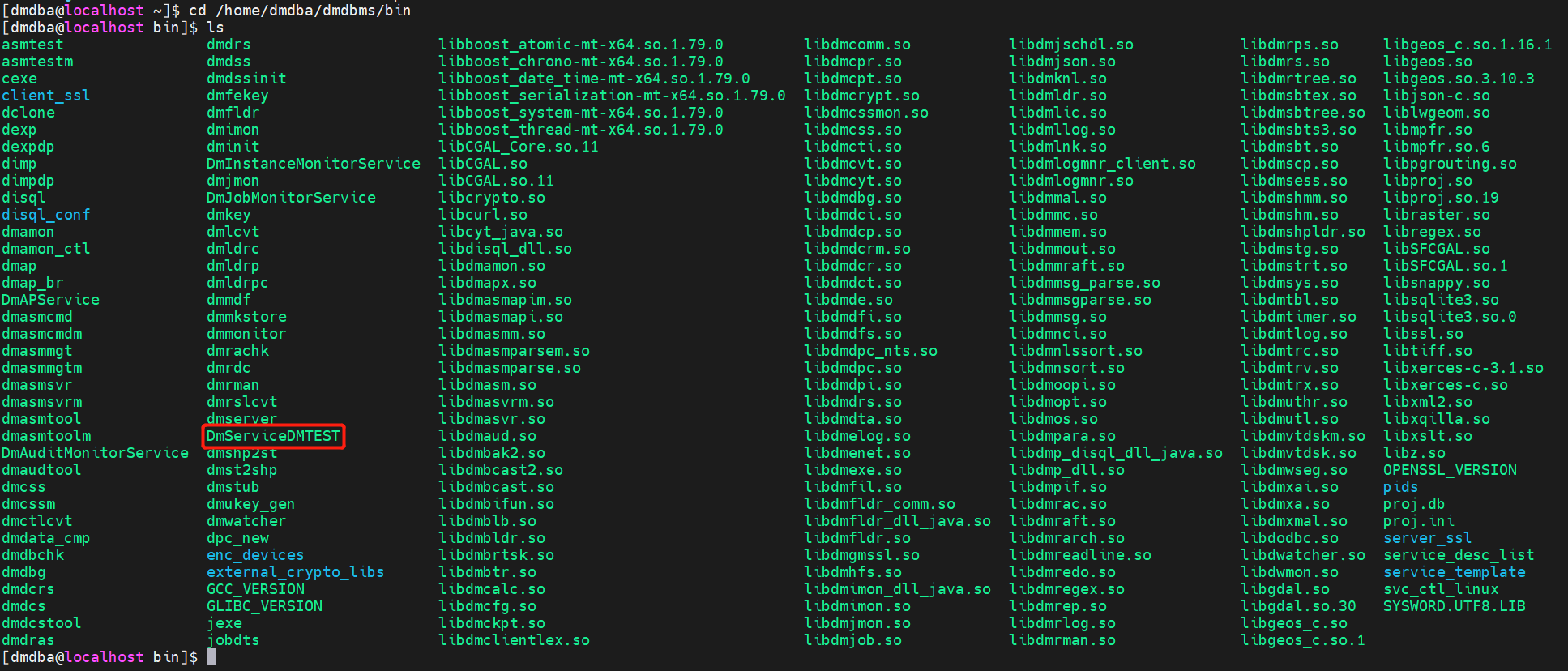
检查注册状态

1
2
cd /home/dmdba/dmdbms/bin
ls

image.png

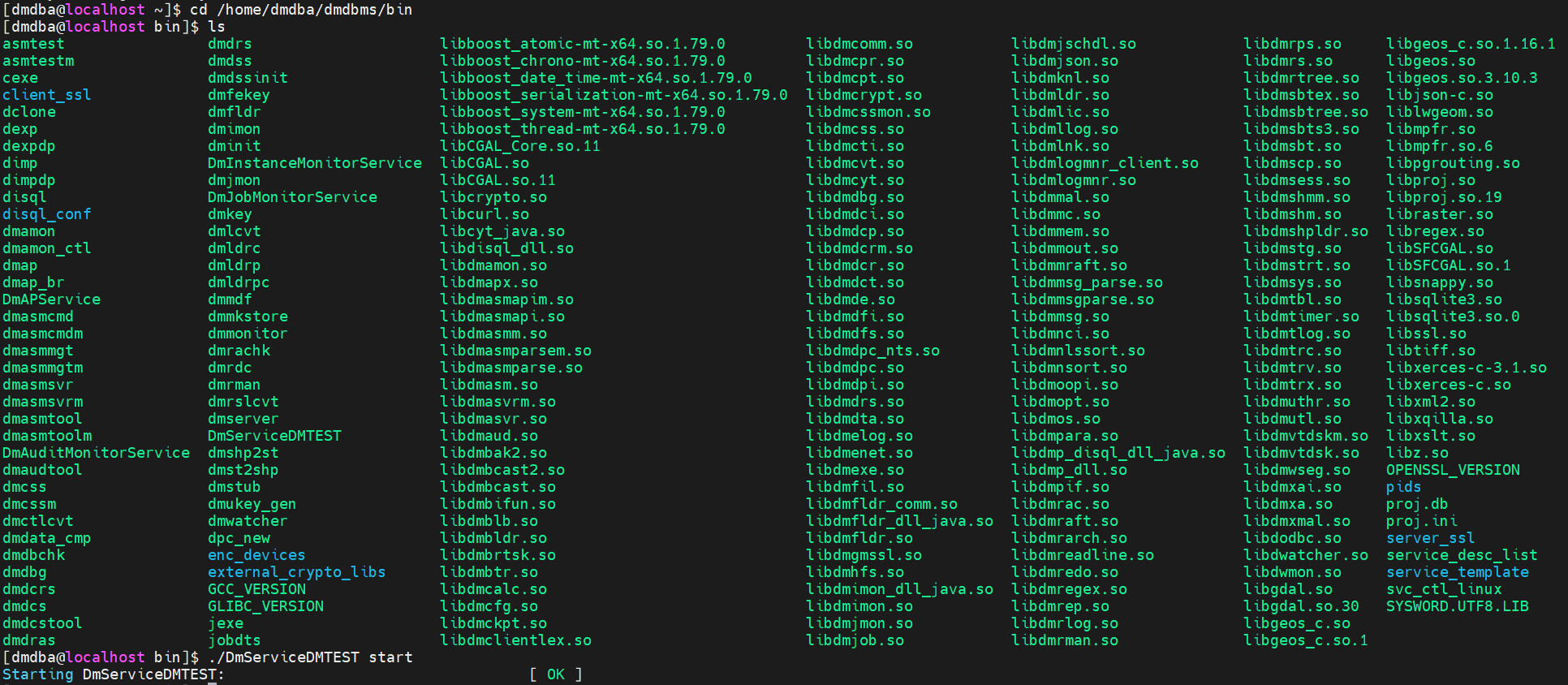
启动与停止数据库

注册完成之后启动数据,使用dmdba进行启动即可

1
2
3
[dmdba@localhost ~]$ cd /home/dmdba/dmdbms/bin
[dmdba@localhost bin]$ ls
[dmdba@localhost bin]$ ./DmServiceDMTEST start

image.png

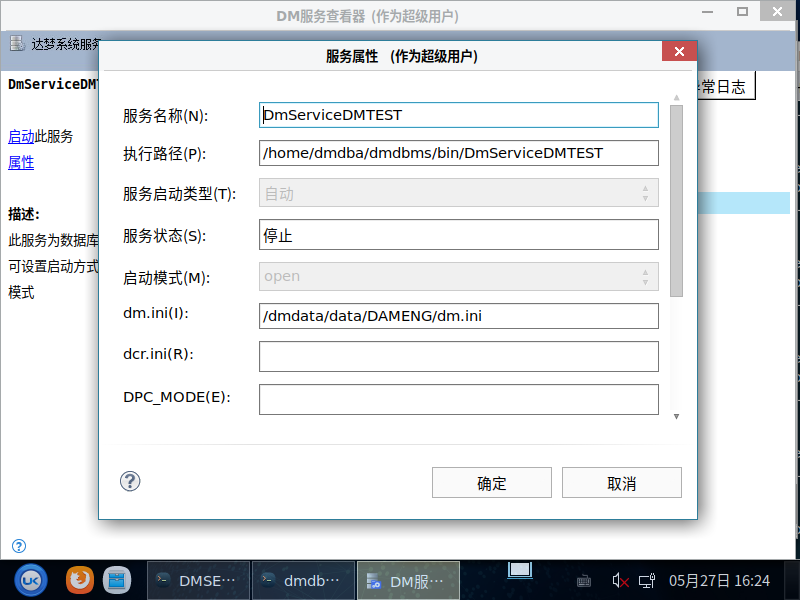
DM服务查看器

这里有个核心问题就是DM服务查看器需要桌面窗口支持的,这里使用xhost +命令可能会导致报错,明明有桌面窗口但是还是报错,使用命令

1
systemctl start lightdm

来进行窗口的启动(注意这里会导致窗口重启,注意保存数据),启动之后使用dmdba账户进行登录,切到root之后输入命令xhost +之后就不再报错,再切回dmdba账户使用export设置display参数即可

1
2
3
4
5
[dmdba@localhost ~]$ export DISPLAY=:0.0
[dmdba@localhost ~]$ echo $DISPLAY
:0.0
[dmdba@localhost ~]$ cd /home/dmdba/dmdbms/tool/
[dmdba@localhost tool]$ ./dmservice.sh

重点问题

可能到DM服务查看器的时候很多人无法启动达梦数据库实例服务,这是因为前面安装的时候使用[dmdba@localhost bin]$ ./DmServiceDMTEST start导致服务占用开启,返回去stop一下即可在DM服务查看器中正常启动运行,这里应该是达梦软件设计问题,导致后台与前台状态不统一
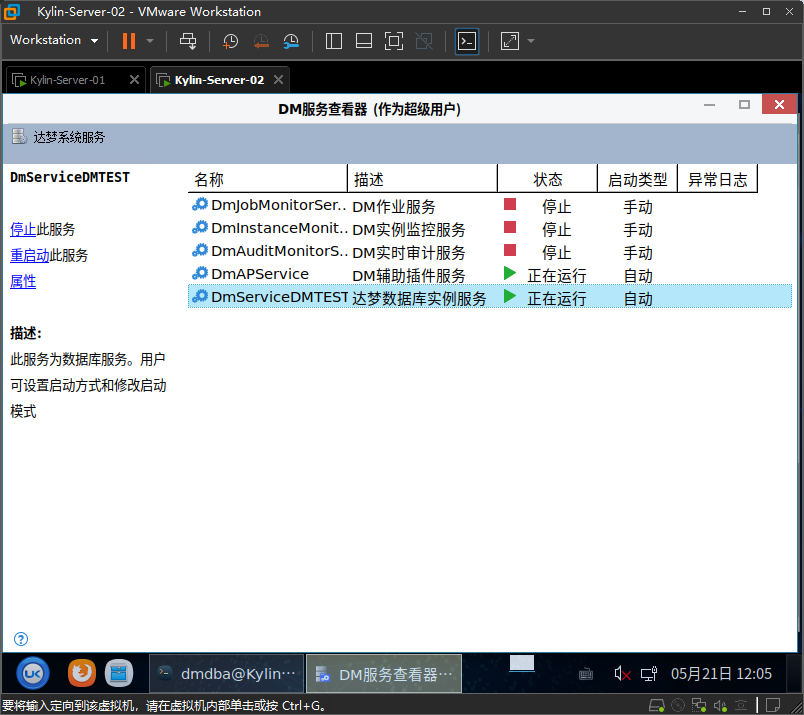
image-20260526144544599

写入数据库内容

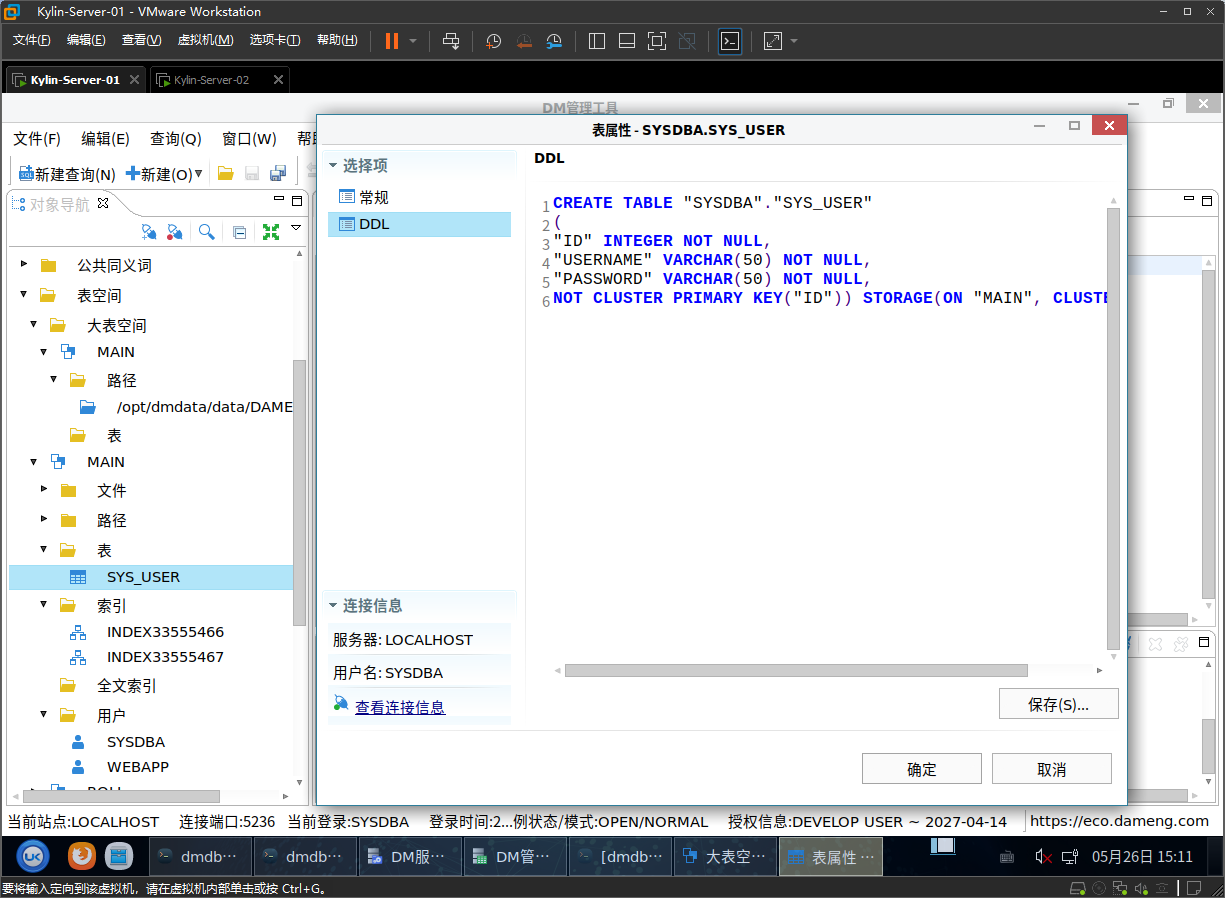
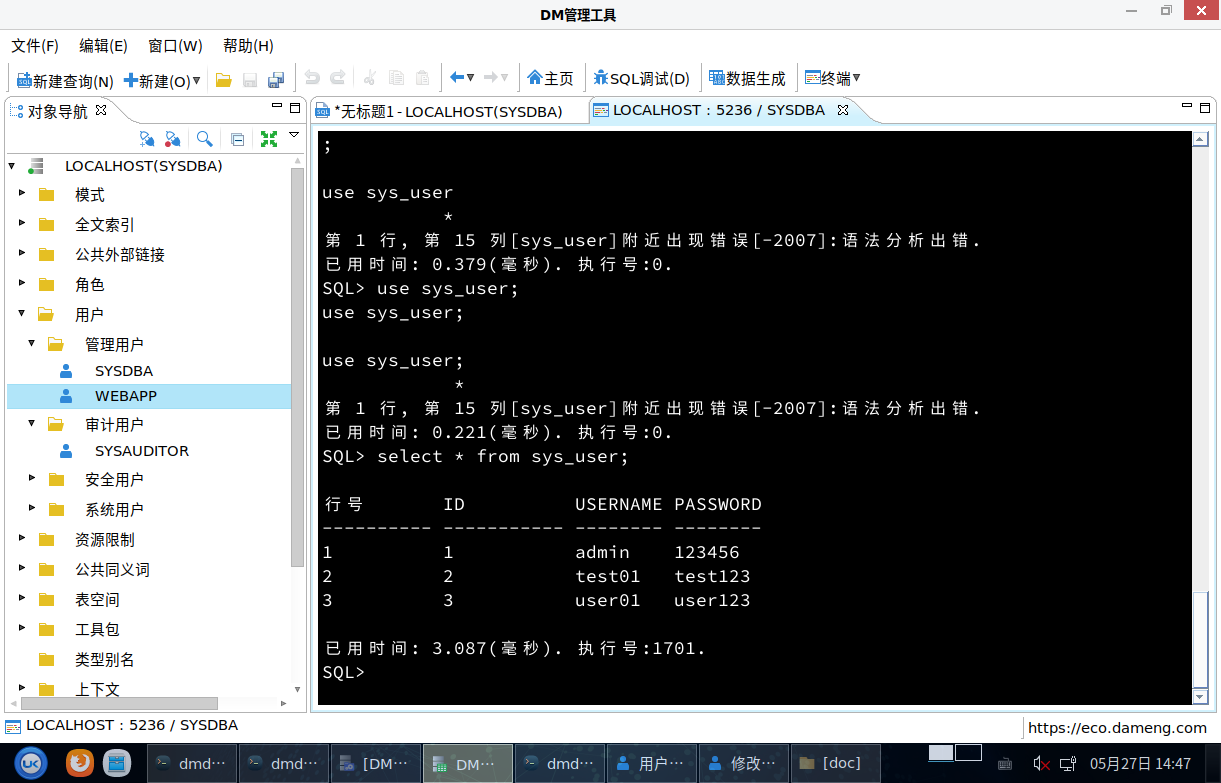
通过tools文件夹下的manager模块启动图形化界面进行数据写入

1
2
3
4
5
6
7
[dmdba@Kylin-Server-01 dmdbms]$ cd tool/
[dmdba@Kylin-Server-01 tool]$ ls
analyzer console.bmp dmservice.sh dts_cmd_run.sh manager nca.sh templates
analyzer.bmp dbca.sh dropins hs_err_pid40982.log manager.bmp p2 version.sh
configuration disql dts hs_err_pid41077.log monitor plugins workspace
console dmagent dts.bmp log4j.xml monitor.bmp resources
[dmdba@Kylin-Server-01 tool]$ ./manager

image-20260526151123762

共享服务器配置

指定其中1台服务器作为共享服务器(Server02)

NFS 服务端配置(Server02)

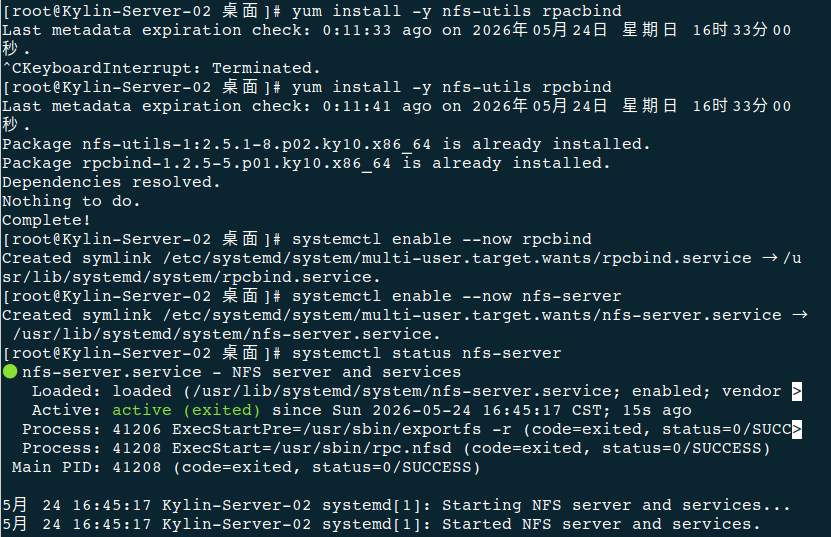
安装 启动NFS 服务端软件

1
2
3
4
5
6
7
8
9
# 安装nfs-utils rpcbind
sudo yum install -y nfs-utils rpcbind

# 启动服务并设置开机自启
sudo systemctl enable --now rpcbind
sudo systemctl enable --now nfs-server

# 验证服务状态
sudo systemctl status nfs-server

image-20260524165500712

创建共享目录并设置权限

1
2
3
4
5
6
7
8
# 创建共享目录
sudo mkdir -p /data/{backup,logs,app}

# 设置目录权限(建议 755,具体根据用户调整)
sudo chmod 755 /data/backup /data/logs /data/app

# 可选:更改属主(如果使用特定用户,如 dbuser)
# sudo chown -R dbuser:dbadmin /data/backup

image-20260524165548752

配置共享规则(/etc/exports)

1
sudo vim /etc/exports

写入内容:

1
2
3
4
# 格式:目录 客户端IP(权限,安全选项)
/data/backup 172.16.220.10(rw,sync,no_root_squash,no_subtree_check) # 仅服务器Server01可读写
/data/logs 172.16.220.0/24(ro,sync,no_subtree_check) # 整个网段只读
/data/app 172.16.220.10(rw,sync,anonuid=1000,anongid=1000,no_subtree_check) # 映射到指定用户

image-20260524174747571

参数解释(安全关键):

  • rw:读写权限(ro为只读)
  • sync:同步写入,保证数据一致性
  • no_root_squash:保留root权限(慎用,仅限备份目录
  • anonuid/anongid:匿名用户映射到指定UID(更安全)
  • 192.168.10.0/24:限制仅该网段访问

修改了 exports,需要重新加载

1
exportfs -ra

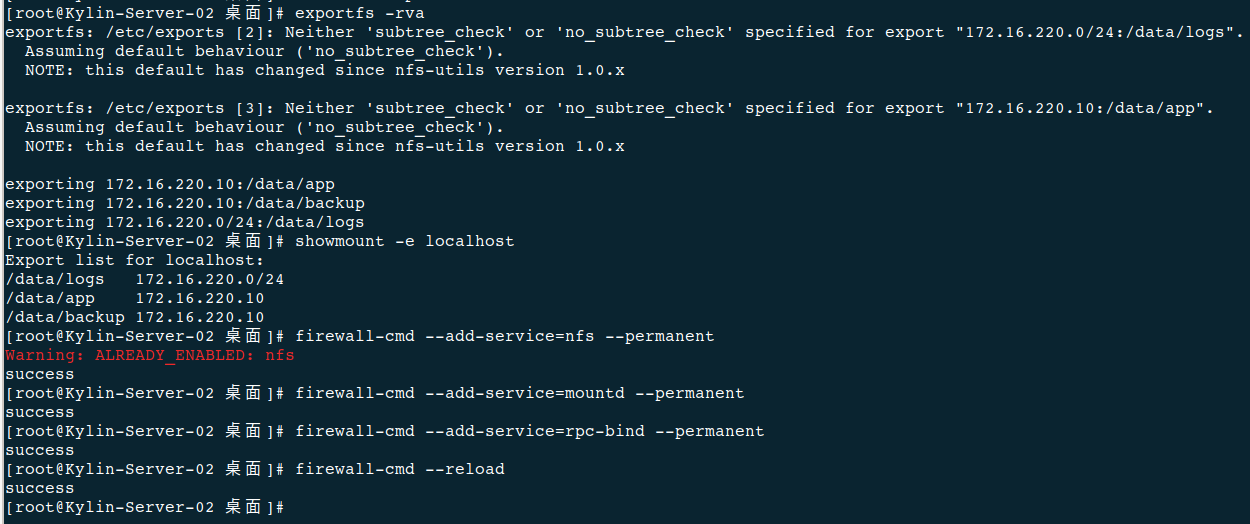
应用配置并验证

1
2
3
4
5
6
7
8
9
10
11
# 重新导出共享列表
sudo exportfs -rva

# 查看本机共享列表
sudo showmount -e localhost

# 开放防火墙端口(NFS需要多个端口)
sudo firewall-cmd --add-service=nfs --permanent
sudo firewall-cmd --add-service=mountd --permanent
sudo firewall-cmd --add-service=rpc-bind --permanent
sudo firewall-cmd --reload

image-20260524170353749

安全与权限加固

禁止匿名访问(默认已禁止)

确保 /etc/exports没有使用 *(rw)这种开放全网的配置。

配置服务日志(用于监控)

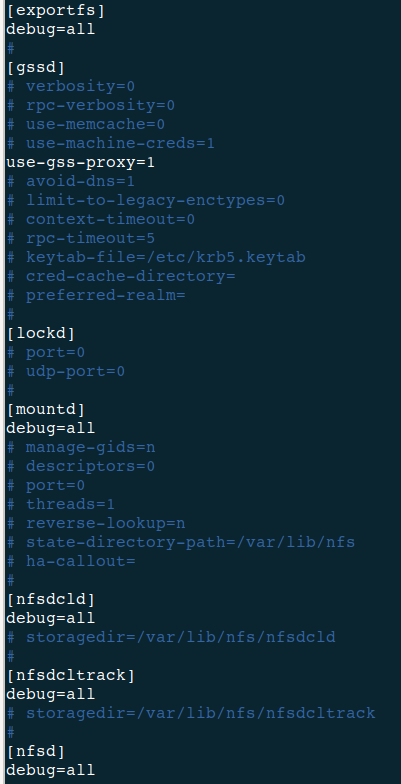
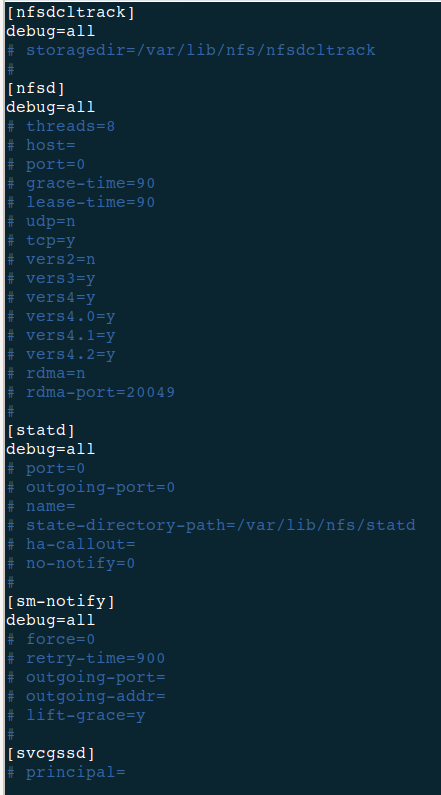
编辑 /etc/nfs.conf,启用详细日志

修改内容:

1
2
3
4
5
6
7
8
9
10
11
12
13
14
15
16
17
18
19
20
21
22
23
24
25
26
27
28
1. [exportfs]模块
找到 [exportfs]部分的 debug行:
原内容:debug=0
修改为:debug=all
2. [mountd]模块
找到 [mountd]部分的 debug行:
原内容:debug=0
修改为:debug=all
3.[nfsdcld]模块
找到 [nfsdcld]部分的 debug行:
原内容:debug=0
修改为:debug=all
4.[nfsdcltrack]模块
找到 [nfsdcltrack]部分的 debug行:
原内容:debug=0
修改为:debug=all
5. [nfsd]模块
找到 [nfsd]部分的 debug行:
原内容:debug=0
修改为:debug=all
6. [statd]模块
找到 [statd]部分的 debug行:
原内容:debug=0
修改为:debug=all
7.[sm-notify]模块
找到 [sm-notify]部分的 debug行:
原内容:debug=0
修改为:debug=all

image-20260524172610184image-20260524172625572

修改完成后保存文件并重启 nfs-server服务,并且验证日志

1
2
systemctl restart nfs-server
tail -f /var/log/messages | grep nfs

image-20260524172731015

客户端挂载(Server01)

安装客户端工具

1
yum install -y nfs-utils

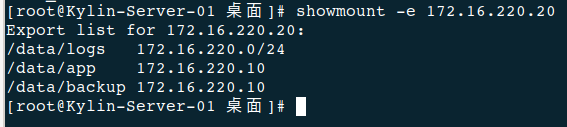
查看服务器Server02(服务端)共享列表

1
sudo showmount -e 172.16.220.20

image-20260524173302562

创建本地挂载点并挂载

1
2
# 创建挂载点
sudo mkdir -p /mnt/{backup,logs,app}

image-20260524173708527

在 Server-01 上手动挂载

image-20260524175545300

开机自动挂载

1
2
3
# 永久挂载(写入fstab)
echo "172.16.220.20:/data/backup /mnt/backup nfs defaults,_netdev 0 0" | sudo tee -a /etc/fstab
echo "172.16.220.20:/data/logs /mnt/logs nfs defaults,_netdev 0 0" | sudo tee -a /etc/fstab

⚠️ _netdev参数表示等待网络就绪后再挂载,避免启动失败。

可用性测试与监控

基础读写测试

1
2
3
4
5
6
# 在客户端(服务器Server01)测试
echo "test file" | sudo tee /mnt/backup/test.txt
sudo ls -l /mnt/backup/test.txt

# 在服务端(服务器Server02)验证
ls -l /data/backup/test.txt

客户端(Server01)

image-20260524173952239

服务端(Server02)

image-20260524175901956

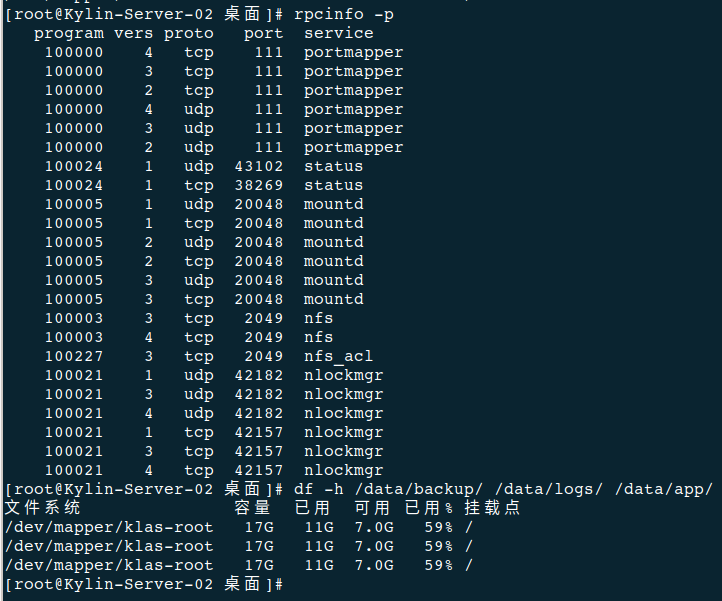
监控服务状态

image-20260524180254772

1
2
3
4
5
# 服务端查看连接状态
sudo rpcinfo -p

# 监控磁盘占用
df -h /data/backup /data/logs /data/app

WEB服务器应⽤部署

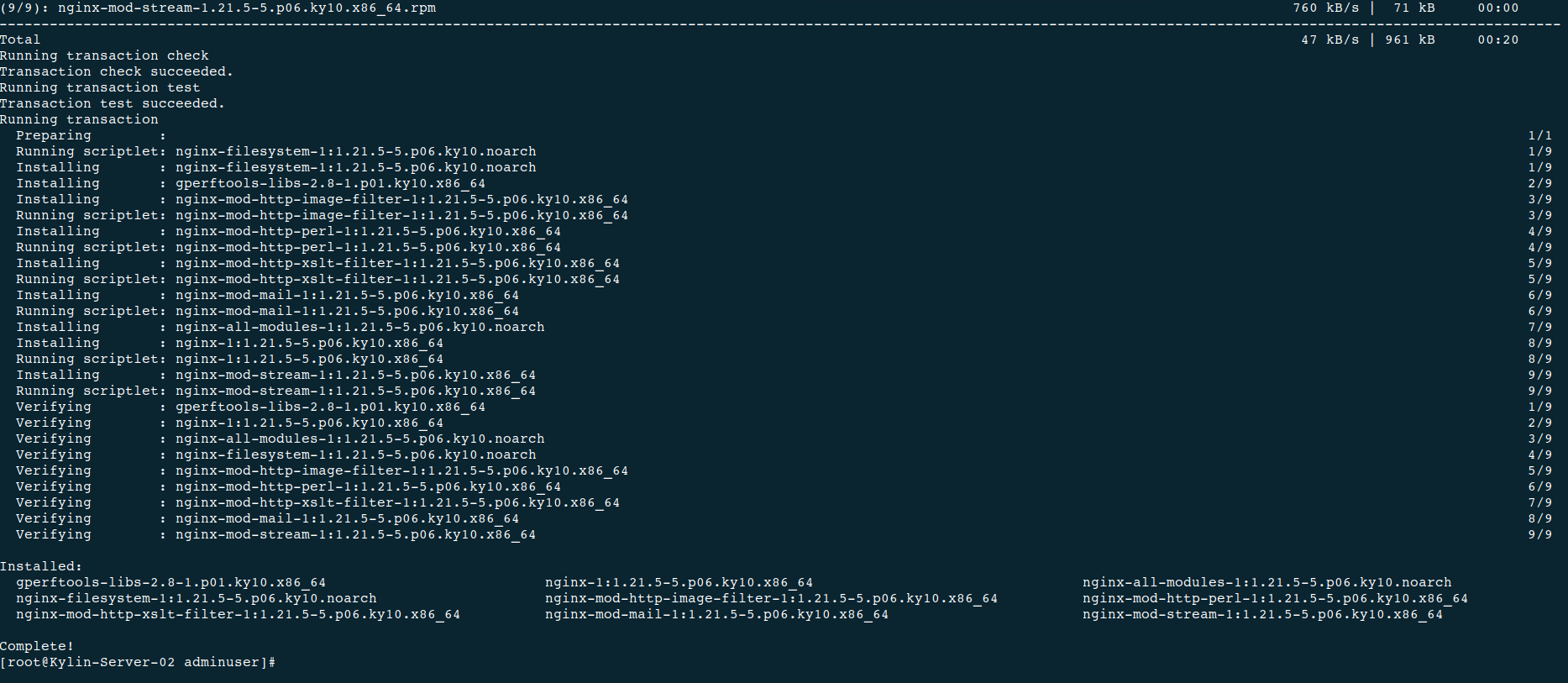
安装 Nginx

1
sudo yum install -y nginx-1.21.5-5.p06.ky10

image-20260526204808452

项目部署

准备好相关项目文件

项目文件结构

/webapp
├── app.py # 核心后端代码(包含数据库连接、接口、页面渲染,可扩展)
└── templates # 页面模板目录(基础版本仅1个首页)
└── index.html # 登录+基础查询页面(UI可自主美化)

app.py

1
2
3
4
5
6
7
8
9
10
11
12
13
14
15
16
17
18
19
20
21
22
23
24
25
26
27
28
29
30
31
32
33
34
35
36
37
38
39
40
41
42
43
44
45
46
47
48
49
50
51
52
53
54
55
56
57
58
59
60
61
62
63
64
65
66
67
68
69
70
71
72
73
74
75
76
77
78
79
80
81
82
83
84
85
86
87
88
89
90
91
92
93
94
95
96
97
98
99
100
101
102
103
104
105
106
107
108
109
110
111
112
113
114
115
116
117
118
119
120
121
122
123
124
125
126
127
128
129
130
131
132
133
134
135
136
137
138
139
140
141
142
143
144
145
146
147
148
149
150
151
152
153
154
155
156
157
158
159
160
161
162
163
164
165
166
167
168
169
170
171
172
173
174
175
176
177
178
179
180
181
182
183
184
185
186
187
188
189
190
191
192
193
194
195
196
197
198
199
200
201
202
203
204
205
206
207
208
209
210
211
212
213
214
215
216
217
218
219
220
221
222
223
224
225
226
227
228
229
230
231
232
233
234
235
236
237
238
239
240
241
242
243
244
245
246
247
248
249
250
251
252
253
254
255
256
257
258
259
260
261
262
263
264
265
266
267
268
269
270
271
272
273
274
275
276
277
278
279
280
281
282
283
284
285
286
287
288
289
290
291
292
293
294
295
296
from flask import Flask, render_template, request, jsonify
import dmPython
import re
from datetime import datetime

app = Flask(__name__)


def get_dm_connection():
try:
conn = dmPython.connect(
user="webapp",
password="Aa123456",
host="192.168.44.130",
port=5236
)
return conn
except Exception as e:
raise Exception(f"数据库连接失败:{str(e)}")


def validate_username(username):
return 3 <= len(username) <= 20


def validate_password(password):

# 至少8位,包含大小写字母和数字
password_rule = re.compile(
r'^(?=.*[a-z])(?=.*[A-Z])(?=.*\d).{8,}$'
)

return password_rule.match(password)


@app.route("/")
def index():
return render_template("index.html")


@app.route("/api/login", methods=["POST"])
def login():

username = request.form.get("username", "").strip()
password = request.form.get("password", "").strip()

# 用户名校验
if not validate_username(username):
return jsonify({
"login_msg": "用户名长度必须为3~20位"
})

# 密码复杂度校验
if not validate_password(password):
return jsonify({
"login_msg": "密码必须包含大小写字母和数字,且不少于8位"
})

try:

conn = get_dm_connection()
cur = conn.cursor()

cur.execute(
"SELECT id, username FROM sys_user WHERE username=? AND password=?",
(username, password)
)

user = cur.fetchone()

# 登录IP
login_ip = request.remote_addr

if user:

login_msg = f"登录成功!欢迎您,{username}(用户ID:{user[0]})"

status = "success"

else:

login_msg = "登录失败:用户名或密码错误"

status = "fail"

# 登录日志
try:

cur.execute(
"""
INSERT INTO login_log
(username, login_time, login_ip, status)
VALUES (?, ?, ?, ?)
""",
(
username,
datetime.now(),
login_ip,
status
)
)

conn.commit()

except:
pass

cur.close()
conn.close()

except Exception as e:

login_msg = f"操作失败:{str(e)}"

return jsonify({
"login_msg": login_msg
})


@app.route("/api/query", methods=["POST"])
def query():

query_username = request.form.get(
"query_username",
""
).strip()

query_id = request.form.get(
"query_id",
""
).strip()

query_msg = ""
query_result = []

try:

conn = get_dm_connection()
cur = conn.cursor()

sql = """
SELECT id, username
FROM sys_user
WHERE 1=1
"""

params = []

# 用户名模糊查询
if query_username:

if len(query_username) > 20:

return jsonify({
"query_msg": "用户名长度不能超过20位"
})

sql += " AND username LIKE ?"

params.append(f"{query_username}%")

# ID查询
if query_id:

sql += " AND id=?"

params.append(query_id)

# 排序
sql += " ORDER BY id DESC"

cur.execute(sql, tuple(params))

query_result = cur.fetchall()

if query_result:

query_msg = f"查询成功,共找到 {len(query_result)} 条记录"

else:

query_msg = "未找到匹配用户"

cur.close()
conn.close()

except Exception as e:

query_msg = f"查询失败:{str(e)}"

return jsonify({
"query_msg": query_msg,
"query_result": query_result
})


@app.route("/api/user/<int:user_id>", methods=["GET"])
def get_user_detail(user_id):

try:

conn = get_dm_connection()
cur = conn.cursor()

cur.execute(
"SELECT id, username FROM sys_user WHERE id=?",
(user_id,)
)

user = cur.fetchone()

cur.close()
conn.close()

if user:

return jsonify({
"status": "success",
"data": {
"id": user[0],
"username": user[1]
}
})

else:

return jsonify({
"status": "fail",
"msg": "未找到该用户"
})

except Exception as e:

return jsonify({
"status": "fail",
"msg": str(e)
})


@app.route("/api/stats", methods=["GET"])
def get_stats():

try:

conn = get_dm_connection()
cur = conn.cursor()

cur.execute(
"SELECT COUNT(*) FROM sys_user"
)

total_users = cur.fetchone()[0]

cur.close()
conn.close()

return jsonify({
"status": "success",
"total_users": total_users
})

except Exception as e:

return jsonify({
"status": "fail",
"msg": str(e)
})


@app.route("/api/logout", methods=["POST"])
def logout():

return jsonify({
"status": "success",
"msg": "退出登录成功"
})


if __name__ == "__main__":

app.run(
host="192.168.44.130",
port=5000,
debug=True
)

templates/index.html

1
2
3
4
5
6
7
8
9
10
11
12
13
14
15
16
17
18
19
20
21
22
23
24
25
26
27
28
29
30
31
32
33
34
35
36
37
38
39
40
41
42
43
44
45
46
47
48
49
50
51
52
53
54
55
56
57
58
59
60
61
62
63
64
65
66
67
68
69
70
71
72
73
74
75
76
77
78
79
80
81
82
83
84
85
86
87
88
89
90
91
92
93
94
95
96
97
98
99
100
101
102
103
104
105
106
107
108
109
110
111
112
113
114
115
116
117
118
119
120
121
122
123
124
125
126
127
128
129
130
131
132
133
134
135
136
137
138
139
140
141
142
143
144
145
146
147
148
149
150
151
152
153
154
155
156
157
158
159
160
161
162
163
164
165
166
167
168
169
170
171
172
173
174
175
176
177
178
179
180
181
182
183
184
185
186
187
188
189
190
191
192
193
194
195
196
197
198
199
200
201
202
203
204
205
206
207
208
209
210
211
212
213
214
215
216
217
218
219
220
221
222
223
224
225
226
227
228
229
230
231
232
233
234
235
236
237
238
239
240
241
242
243
244
245
246
247
248
249
250
251
252
253
254
255
256
257
258
259
260
261
262
263
264
265
266
267
268
269
270
271
272
273
274
275
276
277
278
279
280
281
282
283
284
285
286
287
288
289
290
291
292
293
294
295
296
297
298
299
300
301
302
303
304
305
306
307
308
309
310
311
312
313
314
315
316
317
318
319
320
321
322
323
324
325
326
327
328
329
330
331
332
333
334
335
336
337
338
339
340
341
342
343
344
345
346
347
348
349
350
351
352
353
354
355
356
357
358
359
360
361
362
363
364
365
366
367
368
369
370
371
372
373
374
375
376
377
378
379
380
381
382
383
384
385
386
387
388
389
390
391
392
393
394
395
396
397
398
399
400
401
402
403
404
405
406
407
408
409
410
411
412
413
414
415
416
417
418
419
420
421
422
423
424
425
426
427
428
429
430
431
432
433
434
435
436
437
438
439
440
441
442
443
444
445
446
447
448
449
450
451
452
453
454
455
456
457
458
459
460
461
462
463
464
465
466
467
468
469
470
471
472
473
474
475
476
477
478
479
480
481
482
483
484
485
486
487
488
489
490
491
492
493
494
495
496
497
498
499
500
501
502
503
504
505
506
507
508
509
510
511
512
513
514
515
516
517
518
519
520
521
522
523
524
525
526
527
528
529
530
531
532
533
534
535
536
537
538
539
540
541
542
543
544
545
546
547
548
549
550
551
552
553
554
555
556
557
558
559
560
561
562
563
564
565
566
567
568
569
570
571
572
573
574
575
576
577
578
579
580
581
582
583
584
585
586
587
588
589
590
591
592
593
594
595
596
597
598
599
600
601
602
603
604
605
606
607
608
609
610
611
612
613
614
615
616
617
618
619
620
621
622
623
624
625
626
627
628
629
630
631
632
633
634
635
636
637
638
639
640
641
642
643
644
645
646
647
648
649
650
651
652
653
654
655
656
657
658
659
660
661
662
663
664
665
666
667
668
669
670
671
672
673
674
675
676
677
678
679
680
681
682
683
684
685
686
687
688
689
690
691
692
693
694
695
696
697
698
699
700
701
702
703
704
705
706
707
708
709
710
711
712
713
714
715
716
717
718
719
720
721
722
723
724
725
726
727
728
729
730
731
732
733
734
735
736
737
738
739
740
741
742
743
744
745
746
747
748
749
750
751
752
753
754
755
756
757
758
759
760
761
762
763
764
765
766
767
768
769
770
771
772
773
774
775
776
777
778
779
780
781
782
783
784
785
786
787
788
789
790
791
792
793
794
795
796
797
798
799
800
801
802
803
804
805
806
807
808
809
810
811
812
813
814
815
816
817
818
819
820
821
822
823
824
825
826
827
828
829
830
831
832
833
834
835
836
837
838
839
840
841
842
843
844
845
846
847
848
849
850
851
852
853
854
855
856
857
858
859
860
861
862
863
864
865
866
867
868
869
870
871
872
873
874
875
876
877
878
879
880
881
882
883
884
885
886
887
888
889
890
891
892
893
894
895
896
897
898
899
900
901
902
903
904
905
906
907
908
909
910
911
912
913
914
915
916
917
918
919
920
921
922
923
924
925
926
927
928
929
930
931
932
933
934
935
936
937
938
939
940
941
942
943
944
945
946
947
948
949
950
951
952
953
954
955
956
957
958
959
960
961
962
963
964
965
966
967
968
969
970
971
972
973
974
975
976
977
978
979
980
981
982
983
984
985
986
987
988
989
990
991
992
993
994
995
996
997
998
999
1000
1001
1002
1003
1004
1005
1006
1007
1008
1009
1010
1011
1012
1013
1014
1015
1016
1017
1018
1019
1020
1021
1022
1023
1024
1025
1026
1027
1028
1029
1030
1031
1032
1033
1034
1035
1036
1037
1038
<!doctype html>
<html lang="zh-CN">

<head>

<meta charset="UTF-8"/>

<meta
name="viewport"
content="width=device-width, initial-scale=1.0"
/>

<title>企业信息管理系统</title>

<!-- 图标库 -->

<link
rel="stylesheet"
href="https://cdnjs.cloudflare.com/ajax/libs/font-awesome/6.5.2/css/all.min.css"
/>

<!-- 字体 -->

<link
href="https://fonts.googleapis.com/css2?family=Inter:wght@400;500;600;700&display=swap"
rel="stylesheet"
/>

<style>

*{
margin:0;
padding:0;
box-sizing:border-box;
}

:root{

--primary:#2563eb;
--primary-hover:#1d4ed8;

--success:#16a34a;
--danger:#dc2626;

--bg:#f1f5f9;

--text:#0f172a;
--text-light:#64748b;

--card-bg:rgba(255,255,255,.9);

--border:rgba(148,163,184,.2);

--shadow:
0 8px 30px rgba(15,23,42,.08);

--transition:all .3s ease;
}

body{

min-height:100vh;

font-family:
'Inter',
'Microsoft YaHei',
sans-serif;

background:
linear-gradient(
rgba(15,23,42,.78),
rgba(15,23,42,.82)
),

url('https://images.unsplash.com/photo-1497366754035-f200968a6e72?q=80&w=2070&auto=format&fit=crop')
center/cover no-repeat fixed;

padding:40px 20px;

color:white;
}

.container{

max-width:1300px;

margin:auto;
}

/* 顶部 */

.top-bar{

display:flex;
justify-content:space-between;
align-items:center;

margin-bottom:30px;
}

.brand{

display:flex;
align-items:center;
gap:16px;
}

.brand-logo{

width:64px;
height:64px;

border-radius:20px;

background:
linear-gradient(
135deg,
#2563eb,
#3b82f6
);

display:flex;
align-items:center;
justify-content:center;

font-size:28px;

box-shadow:
0 12px 24px rgba(37,99,235,.35);
}

.brand-text h1{

font-size:30px;

margin-bottom:6px;
}

.brand-text p{

color:rgba(255,255,255,.75);
}

/* 布局 */

.dashboard{

display:grid;

grid-template-columns:
380px 1fr;

gap:30px;
}

/* 卡片 */

.card{

background:
linear-gradient(
135deg,
rgba(255,255,255,.92),
rgba(255,255,255,.82)
);

backdrop-filter:
blur(20px);

border-radius:28px;

padding:34px;

box-shadow:var(--shadow);

border:
1px solid rgba(255,255,255,.2);

color:var(--text);

position:relative;

overflow:hidden;
}

.card::before{

content:'';

position:absolute;

top:-100px;
right:-60px;

width:220px;
height:220px;

background:
radial-gradient(
circle,
rgba(37,99,235,.16),
transparent 70%
);
}

.card h2{

font-size:28px;

margin-bottom:10px;
}

.card p{

color:var(--text-light);

margin-bottom:28px;

line-height:1.7;
}

/* 输入框 */

.form-group{
margin-bottom:22px;
}

.form-label{

display:flex;
align-items:center;
gap:8px;

font-weight:600;

margin-bottom:10px;
}

.input-wrapper{
position:relative;
}

.input-wrapper i{

position:absolute;

left:16px;
top:50%;

transform:translateY(-50%);

color:#94a3b8;
}

input{

width:100%;

height:56px;

border-radius:18px;

border:1px solid var(--border);

background:white;

padding:0 18px 0 48px;

font-size:15px;

transition:var(--transition);
}

input:focus{

outline:none;

border-color:rgba(37,99,235,.5);

box-shadow:
0 0 0 4px rgba(37,99,235,.08);

transform:translateY(-1px);
}

/* 按钮 */

.btn-group{

display:flex;

flex-direction:column;

gap:14px;

margin-top:28px;
}

button{

border:none;

height:56px;

border-radius:18px;

font-size:15px;
font-weight:600;

cursor:pointer;

transition:var(--transition);
}

button:hover{
transform:translateY(-2px);
}

.btn-primary{

background:
linear-gradient(
135deg,
#2563eb,
#3b82f6
);

color:white;

box-shadow:
0 10px 24px rgba(37,99,235,.28);
}

.btn-primary:hover{

background:
linear-gradient(
135deg,
#1d4ed8,
#2563eb
);
}

.btn-danger{

background:
linear-gradient(
135deg,
#dc2626,
#ef4444
);

color:white;
}

/* 提示 */

.msg{

display:none;

margin-top:18px;

padding:14px 18px;

border-radius:16px;

font-size:14px;
font-weight:500;
}

.success{

background:
rgba(22,163,74,.08);

border:
1px solid rgba(22,163,74,.2);

color:var(--success);
}

.error{

background:
rgba(220,38,38,.08);

border:
1px solid rgba(220,38,38,.2);

color:var(--danger);
}

/* 顶部统计 */

.stats{

display:grid;

grid-template-columns:
repeat(2,1fr);

gap:18px;

margin-bottom:28px;
}

.stats-card{

padding:24px;

border-radius:22px;

background:
linear-gradient(
135deg,
#2563eb,
#3b82f6
);

color:white;

box-shadow:
0 10px 28px rgba(37,99,235,.3);
}

.stats-card h3{

font-size:14px;

margin-bottom:10px;

opacity:.85;
}

.stats-card h1{

font-size:36px;
}

/* 表格 */

.table-wrapper{

overflow-x:auto;

border-radius:22px;

margin-top:24px;

border:
1px solid rgba(148,163,184,.12);
}

table{

width:100%;

border-collapse:collapse;

background:white;
}

thead{

background:
linear-gradient(
135deg,
#0f172a,
#1e293b
);

color:white;
}

th{

padding:18px;

text-align:left;

font-size:14px;
}

td{

padding:18px;

border-bottom:
1px solid rgba(148,163,184,.12);

font-size:14px;
}

tbody tr{

transition:var(--transition);
}

tbody tr:hover{

background:
rgba(37,99,235,.04);
}

.badge{

display:inline-flex;
align-items:center;
gap:8px;

padding:8px 14px;

border-radius:999px;

background:
rgba(37,99,235,.08);

color:var(--primary);

font-weight:600;
}

.status-ok{

color:var(--success);

font-weight:600;
}

/* 响应式 */

@media(max-width:1100px){

.dashboard{
grid-template-columns:1fr;
}

}

@media(max-width:768px){

.card{
padding:24px;
}

.stats{
grid-template-columns:1fr;
}

.brand-text h1{
font-size:22px;
}

}

</style>

</head>

<body>

<div class="container">

<!-- 顶部 -->

<div class="top-bar">

<div class="brand">

<div class="brand-logo">
<i class="fa-solid fa-layer-group"></i>
</div>

<div class="brand-text">

<h1>Enterprise Manager</h1>

<p>
企业级用户信息管理平台
</p>

</div>

</div>

</div>

<div class="dashboard">

<!-- 左侧 -->

<div class="card">

<h2>系统登录</h2>

<p>
支持密码复杂度验证、登录日志记录与安全校验
</p>

<form id="loginForm">

<div class="form-group">

<label class="form-label">

<i class="fa-regular fa-user"></i>

用户名

</label>

<div class="input-wrapper">

<input
type="text"
id="username"
name="username"
placeholder="请输入用户名"
/>

<i class="fa-solid fa-user"></i>

</div>

</div>

<div class="form-group">

<label class="form-label">

<i class="fa-solid fa-lock"></i>

登录密码

</label>

<div class="input-wrapper">

<input
type="password"
id="password"
name="password"
placeholder="请输入登录密码"
/>

<i class="fa-solid fa-key"></i>

</div>

</div>

<div class="btn-group">

<button
type="submit"
class="btn-primary"
>
登录系统
</button>

<button
type="button"
class="btn-danger"
id="logoutBtn"
>
退出登录
</button>

</div>

</form>

<div id="loginMsg" class="msg"></div>

</div>

<!-- 右侧 -->

<div class="card">

<!-- 统计 -->

<div class="stats">

<div class="stats-card">

<h3>系统用户总数</h3>

<h1 id="userCount">0</h1>

</div>

<div class="stats-card">

<h3>系统运行状态</h3>

<h1>正常</h1>

</div>

</div>

<h2>用户信息查询</h2>

<p>
支持按用户名、用户ID、多条件组合查询与模糊查询
</p>

<form id="queryForm">

<div class="form-group">

<label class="form-label">

<i class="fa-solid fa-user"></i>

用户名查询

</label>

<div class="input-wrapper">

<input
type="text"
id="query_username"
name="query_username"
placeholder="请输入用户名"
/>

<i class="fa-solid fa-search"></i>

</div>

</div>

<div class="form-group">

<label class="form-label">

<i class="fa-solid fa-id-card"></i>

用户ID查询

</label>

<div class="input-wrapper">

<input
type="number"
id="query_id"
name="query_id"
placeholder="请输入用户ID"
/>

<i class="fa-solid fa-hashtag"></i>

</div>

</div>

<div class="btn-group">

<button
type="submit"
class="btn-primary"
>
开始查询
</button>

</div>

</form>

<div id="queryMsg" class="msg"></div>

<!-- 表格 -->

<div class="table-wrapper">

<table>

<thead>

<tr>

<th>用户ID</th>
<th>用户名</th>
<th>状态</th>
<th>数据来源</th>

</tr>

</thead>

<tbody id="tableBody"></tbody>

</table>

</div>

</div>

</div>

</div>

<script>

// 密码验证

function validatePassword(password){

const regex =
/^(?=.*[a-z])(?=.*[A-Z])(?=.*\d).{8,}$/;

return regex.test(password);

}

// 登录

document
.getElementById('loginForm')
.addEventListener('submit',function(e){

e.preventDefault();

const username =
document
.getElementById('username')
.value
.trim();

const password =
document
.getElementById('password')
.value
.trim();

const loginMsg =
document.getElementById('loginMsg');

if(
username.length < 3 ||
username.length > 20
){

loginMsg.className =
'msg error';

loginMsg.style.display='block';

loginMsg.innerHTML =
'用户名长度必须3~20位';

return;
}

if(!validatePassword(password)){

loginMsg.className =
'msg error';

loginMsg.style.display='block';

loginMsg.innerHTML =
'密码必须包含大小写字母和数字,且至少8位';

return;
}

const formData =
new FormData(this);

fetch('/api/login',{

method:'POST',

body:formData

})

.then(res=>res.json())

.then(data=>{

loginMsg.style.display='block';

loginMsg.className =
data.login_msg.includes('成功')
? 'msg success'
: 'msg error';

loginMsg.innerHTML =
data.login_msg;

});

});

// 查询

document
.getElementById('queryForm')
.addEventListener('submit',function(e){

e.preventDefault();

const formData =
new FormData(this);

fetch('/api/query',{

method:'POST',

body:formData

})

.then(res=>res.json())

.then(data=>{

const queryMsg =
document.getElementById('queryMsg');

queryMsg.style.display='block';

queryMsg.className =
data.query_msg.includes('成功')
? 'msg success'
: 'msg error';

queryMsg.innerHTML =
data.query_msg;

const tableBody =
document.getElementById('tableBody');

tableBody.innerHTML='';

if(data.query_result){

data.query_result.forEach(user=>{

const tr =
document.createElement('tr');

tr.innerHTML=`

<td>#${user[0]}</td>

<td>

<span class="badge">

<i class="fa-regular fa-user"></i>

${user[1]}

</span>

</td>

<td>
<span class="status-ok">
正常
</span>
</td>

<td>DM8 Database</td>

`;

tableBody.appendChild(tr);

});

}

});

});

// 加载统计

function loadStats(){

fetch('/api/stats')

.then(res=>res.json())

.then(data=>{

if(data.status==='success'){

document
.getElementById('userCount')
.innerHTML =
data.total_users;

}

});

}

loadStats();

// 退出登录

document
.getElementById('logoutBtn')
.addEventListener('click',()=>{

fetch('/api/logout',{

method:'POST'

})

.then(res=>res.json())

.then(data=>{

alert(data.msg);

location.reload();

});

});

</script>

</body>
</html>

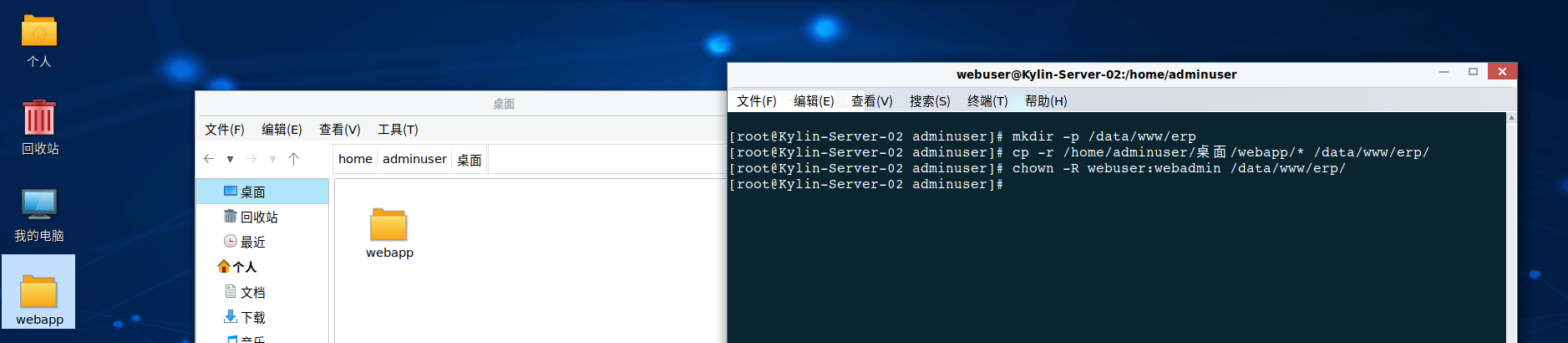
/webapp目录上传到服务器并给予对应用户权限

image-20260526220035302

安装 Python 及数据库驱动

1
2
3
4
5
6
7
8
# 1. 安装系统依赖
sudo yum install -y python3 python3-pip gcc

# 2. 安装 dmPython 驱动
sudo pip3 install dmPython

# 3. 测试一下是否能导入(此时不需要运行,只是验证环境)
sudo -u webadmin python3 -c "import dmPython; print('dmPython installed successfully')"

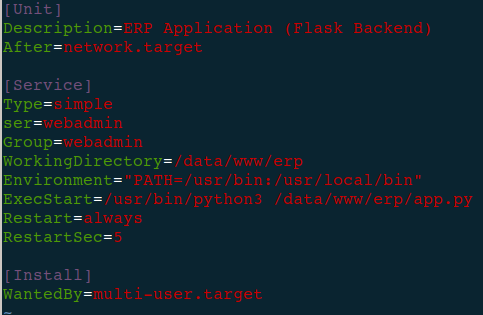
配置 Systemd 托管 Flask 后端(开机自启)

创建 Systemd 服务文件

1
sudo vim /etc/systemd/system/erp-app.service

写入以下内容

1
2
3
4
5
6
7
8
9
10
11
12
13
14
15
16
[Unit]
Description=ERP Application (Flask Backend)
After=network.target

[Service]
Type=simple
User=webadmin # 使用专用用户运行
Group=webadmin
WorkingDirectory=/data/www/erp # 项目根目录
Environment="PATH=/usr/bin:/usr/local/bin" # 确保 python3 能被找到
ExecStart=/usr/bin/python3 /data/www/erp/app.py # 启动命令
Restart=always # 崩溃自动重启
RestartSec=5

[Install]
WantedBy=multi-user.target

image-20260526221503129

启动后端服务

1
2
3
4
sudo systemctl daemon-reload
sudo systemctl enable --now erp-app
# 检查状态,确保是 running 且没有报错
sudo systemctl status erp-app

看到 active (running)表示后端启动成功。如果失败,请查看日志 journalctl -u erp-app -f

配置 Nginx 反向代理

备份默认配置,新建站点配置

1
2
3
4
5
# 备份默认配置(如果没有则跳过)
sudo mv /etc/nginx/conf.d/default.conf /etc/nginx/conf.d/default.conf.bak

# 新建配置文件
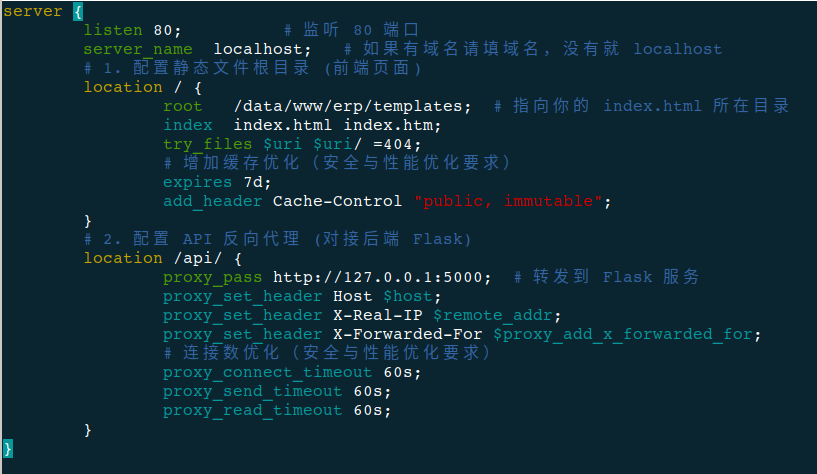
sudo vim /etc/nginx/conf.d/erp.conf

写入内容

1
2
3
4
5
6
7
8
9
10
11
12
13
14
15
16
17
18
19
20
21
22
23
24
25
26
27
28
server {
listen 80; # 监听 80 端口
server_name localhost; # 如果有域名请填域名,没有就 localhost

# 1. 配置静态文件根目录 (前端页面)
location / {
root /data/www/erp/templates; # 指向你的 index.html 所在目录
index index.html index.htm;
try_files $uri $uri/ =404;

# 增加缓存优化(安全与性能优化要求)
expires 7d;
add_header Cache-Control "public, immutable";
}

# 2. 配置 API 反向代理 (对接后端 Flask)
location /api/ {
proxy_pass http://127.0.0.1:5000; # 转发到 Flask 服务
proxy_set_header Host $host;
proxy_set_header X-Real-IP $remote_addr;
proxy_set_header X-Forwarded-For $proxy_add_x_forwarded_for;

# 连接数优化(安全与性能优化要求)
proxy_connect_timeout 60s;
proxy_send_timeout 60s;
proxy_read_timeout 60s;
}
}

image-20260526222707834

这段配置的作用是:

  • /请求:直接交给 Nginx 读取 /data/www/erp/templates/index.html(静态页面)。
  • /api/请求:转发(Proxy)给后端的 http://127.0.0.1:5000

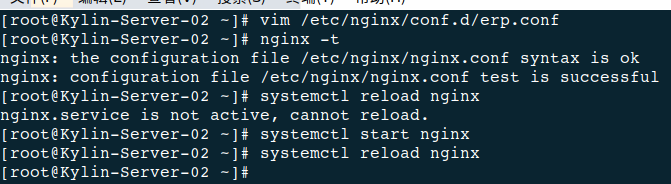
检查并重载 Nginx

1
2
3
4
5
# 检查配置文件语法是否正确
sudo nginx -t

# 如果显示 "syntax is ok",则重载配置
sudo systemctl reload nginx

image-20260526222812994

权限收紧

Nginx 默认是用 nginx用户运行的,它只需要读取 /data/www/erp目录

1
2
# 确保 nginx 用户能读取 webapp 目录
sudo chmod -R 755 /data/www/erp

image-20260526223229528

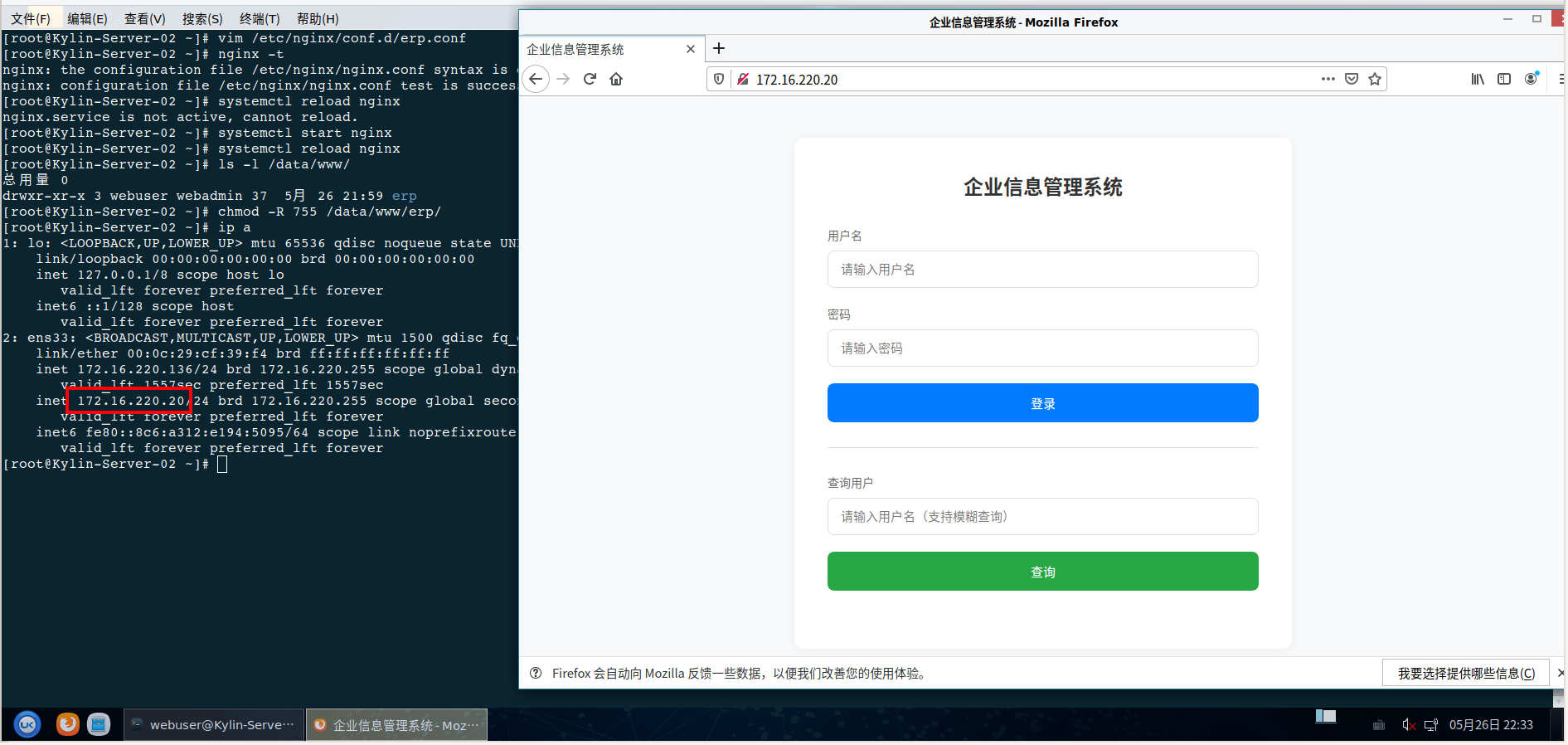
可用性测试

浏览器访问本机地址

image-20260526223433264

达梦完全配置

介绍

紧接上文在KylinOS-Server-V10-SP3中配置好了达梦数据库DM8,创建了普通用户webapp来避开权限问题。同时配置了Nginx+Flask实现了一个基础的前后端交互网页。
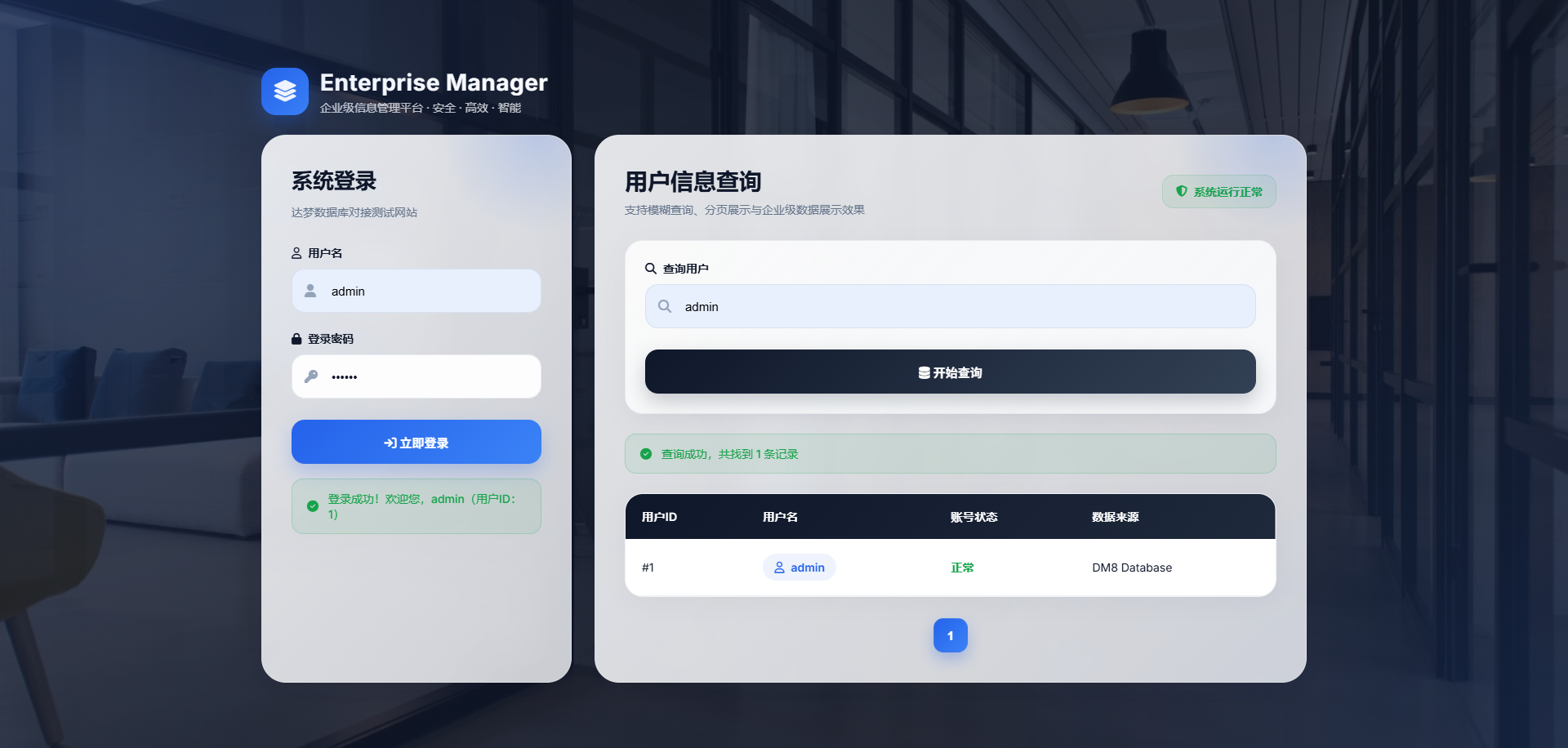
web服务器

按照剩余题目要求,需要实现以下内容

数据库集群搭建

  1. 主从集群搭建:完成达梦数据库主从集群搭建,实现主从节点数据实时同步,确保主节点故障时,从节点可正常切换,保障数据库⾼可⽤。

数据库配置与管理

  1. 数据库管理:创建数据库表空间、数据表、专⽤应⽤⽤⼾,分配合理权限;导⼊测试数据(数据量规模⾃定,需满⾜应⽤查询需求);配置数据库备份策略(备份⽅式、频率⾃定),确保数据安全,可正常完成备份与恢复操作。

先前准备

首先需要保证各项服务的正常运行与联通

1
2
3
4
5
6
7
8
9
10
11
12
13
14
15
16
17
18
19
20
21
22
23
24
25
26
27
28
29
30
31
32
33
34
35
36
37
38
39
40
41
42
43
44
45
46
47
48
49
50
51
52
53
54
55
56
57
58
59
60
61
62
[root@Kylin-Server-02 erp]# systemctl status nfs
● nfs-server.service - NFS server and services
Loaded: loaded (/usr/lib/systemd/system/nfs-server.service; enabled; vendor preset: disabled)
Drop-In: /run/systemd/generator/nfs-server.service.d
└─order-with-mounts.conf
Active: active (exited) since Thu 2026-05-21 15:36:30 CST; 5 days ago
Main PID: 48732 (code=exited, status=0/SUCCESS)
Tasks: 0
Memory: 0B
CGroup: /system.slice/nfs-server.service

5月 21 15:36:30 Kylin-Server-02 systemd[1]: Starting NFS server and services...
5月 21 15:36:30 Kylin-Server-02 rpc.nfsd[48732]: rpc.nfsd: knfsd is currently down
5月 21 15:36:30 Kylin-Server-02 rpc.nfsd[48732]: rpc.nfsd: Writing version string to kernel: -2 +3 +4 +4.1 +4.2
5月 21 15:36:30 Kylin-Server-02 rpc.nfsd[48732]: rpc.nfsd: Created AF_INET TCP socket.
5月 21 15:36:30 Kylin-Server-02 rpc.nfsd[48732]: rpc.nfsd: Created AF_INET6 TCP socket.
5月 21 15:36:30 Kylin-Server-02 systemd[1]: Started NFS server and services.

[root@Kylin-Server-02 erp]# systemctl status erp-app.service
● erp-app.service - ERP Application (Flask Backend)
Loaded: loaded (/etc/systemd/system/erp-app.service; enabled; vendor preset: disabled)
Active: active (running) since Wed 2026-05-27 14:09:44 CST; 35min ago
Main PID: 54991 (python3)
Tasks: 4
Memory: 44.2M
CGroup: /system.slice/erp-app.service
├─54991 /usr/bin/python3 /data/www/erp/app.py
└─54993 /usr/bin/python3 /data/www/erp/app.py

5月 27 14:13:08 Kylin-Server-02 python3[54993]: 192.168.44.1 - - [27/May/2026 14:13:08] "GET / HTTP/1.1" 200 -

[root@Kylin-Server-02 erp]# df -h /data/backup /data/logs /data/app
文件系统 容量 已用 可用 已用% 挂载点
/dev/mapper/klas-root 37G 21G 17G 56% /
[root@Kylin-Server-02 erp]# rpcinfo -p
program vers proto port service
100000 4 tcp 111 portmapper
100000 3 tcp 111 portmapper
100000 2 tcp 111 portmapper
100000 4 udp 111 portmapper
100000 3 udp 111 portmapper
100000 2 udp 111 portmapper
100024 1 udp 58803 status
100024 1 tcp 41031 status
100005 1 udp 20048 mountd
100005 1 tcp 20048 mountd
100005 2 udp 20048 mountd
100005 2 tcp 20048 mountd
100005 3 udp 20048 mountd
100005 3 tcp 20048 mountd
100003 3 tcp 2049 nfs
100003 4 tcp 2049 nfs
100227 3 tcp 2049 nfs_acl
100021 1 udp 50281 nlockmgr
100021 3 udp 50281 nlockmgr
100021 4 udp 50281 nlockmgr
100021 1 tcp 43077 nlockmgr
100021 3 tcp 43077 nlockmgr
100021 4 tcp 43077 nlockmgr

数据库状态

配置数据库

首先配置数据库热备,也就是开启数据库归档模式,此时需要完全关闭达梦数据库

1
2
3
ps -ef | grep dmserver
kill -9 PID
/home/dmdba/dmdbms/bin/DmServiceDMSERVER stop

修改dm.ini,找到/dmdata/data/DAMENG下的dm.ini打开,将ARCH_INI设置为1,保存退出
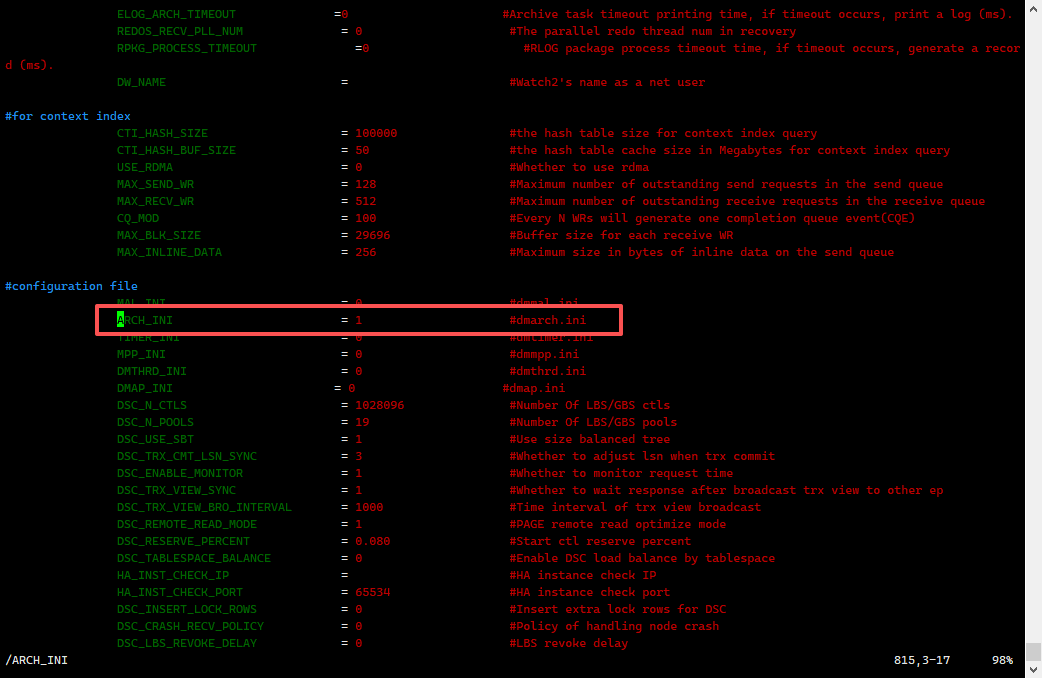
image-20260527161946577

创建一个临时的归档目录(相当于中转站的形式)

1
2
mkdir -p /dmarch
chmod -R 777 /dmarch

使用mount的形式挂载数据库,这里其实感觉使用./dmservice.sh来启动数据库应该可以,笔者没有尝试,因为看路径来说调用的dm.ini是一致的,就是不清楚mount与非mount区别

1
/home/dmdba/dmdbms/bin/dmserver /dmdata/DMDB/dm.ini mount

image-20260527162406210

使用命令行mount之后命令行暂时保持不关闭挂载到后台,此时使用dmdba用户进行登录

1
2
3
4
5
6
7
8
9
10
11
12
13
14
15
16
17
18
19
20
21
22
23
24
25
[root@Kylin-Server-02 bin]# ./disql SYSDBA/SYSDBA

服务器[LOCALHOST:5236]:处于普通配置状态
登录使用时间 : 2.259(ms)
disql V8
SQL> alter database add archivelog
'DEST=/dmarch,TYPE=LOCAL,FILE_SIZE=1024,SPACE_LIMIT=20480';2
操作已执行
已用时间: 7.078(毫秒). 执行号:0.
SQL> alter database archivelog;
操作已执行
已用时间: 25.512(毫秒). 执行号:0.
SQL> alter database open;
操作已执行
已用时间: 47.272(毫秒). 执行号:0.
SQL> select arch_mode from v$database;

行号 ARCH_MODE
---------- ---------
1 Y

已用时间: 18.815(毫秒). 执行号:101.
SQL> backup database full backupset '/data/backup/full_20260527';
操作已执行
已用时间: 00:00:04.168. 执行号:801.

这里还有一个问题,可能会有人遇到数据库属于普通打开模式,如下图红框所示,需要先改变数据库的状态,使用alter database MOUNT;切换数据库模式才能执行上面的步骤,注意Server1需要配置为主库也就是Primary,Server2则需要配置为备库Standby
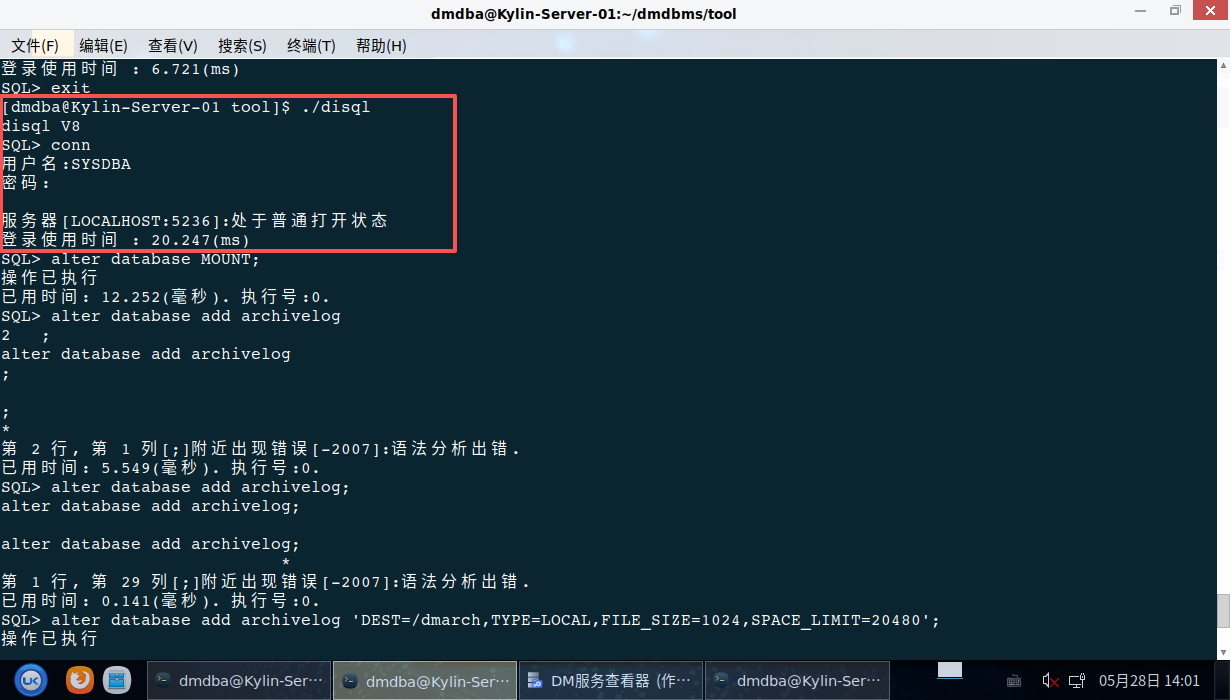
image-20260528140232532

注意最后运行备份可能会遇到报错创建失败以及权限不足问题,通过以下命令来纠正

1
2
[root@Kylin-Server-02 tool]# chown -R dmdba:dinstall /data/backup/*
[root@Kylin-Server-02 tool]# chmod 755 /data/backup/*

脚本配置

来到达梦数据库的bin文件夹下创建新文件full_backup.sh,向脚本内写入以下内容,并赋予权限

full_backup.sh

1
2
3
4
5
6
7
8
9
10
11
12
13
14
15
16
17
#!/bin/bash

DATE=$(date +%F_%H-%M-%S)

LOG=/data/backup/backup.log

echo "===== backup start $DATE =====" >> $LOG
./disql SYSDBA/SYSDBA@127.0.0.1:5236 <<EOF >> $LOG 2>&1

backup database full
backupset '/data/backup/full_$DATE';

exit;

EOF

echo "===== backup end =====" >> $LOG

赋予权限,chmod +x full_backup.sh并运行./full_backup.sh

1
2
3
4
5
6
7
8
9
10
11
12
13
14
15
16
17
18
[dmdba@Kylin-Server-02 bin]$ ./full_backup.sh 
[dmdba@Kylin-Server-02 bin]$ cat /data/backup/backup.log
===== backup start 2026-05-27_16-15-13 =====

服务器[127.0.0.1:5236]:处于普通打开状态
登录使用时间 : 2.148(ms)
disql V8
SQL> SQL> 2 操作已执行
已用时间: 00:00:04.214. 执行号:1501.
SQL> SQL> ===== backup end =====
===== backup start 2026-05-27_16-28-35 =====

服务器[127.0.0.1:5236]:处于普通打开状态
登录使用时间 : 3.567(ms)
disql V8
SQL> SQL> 2 操作已执行
已用时间: 00:00:04.617. 执行号:1701.
SQL> SQL> ===== backup end =====

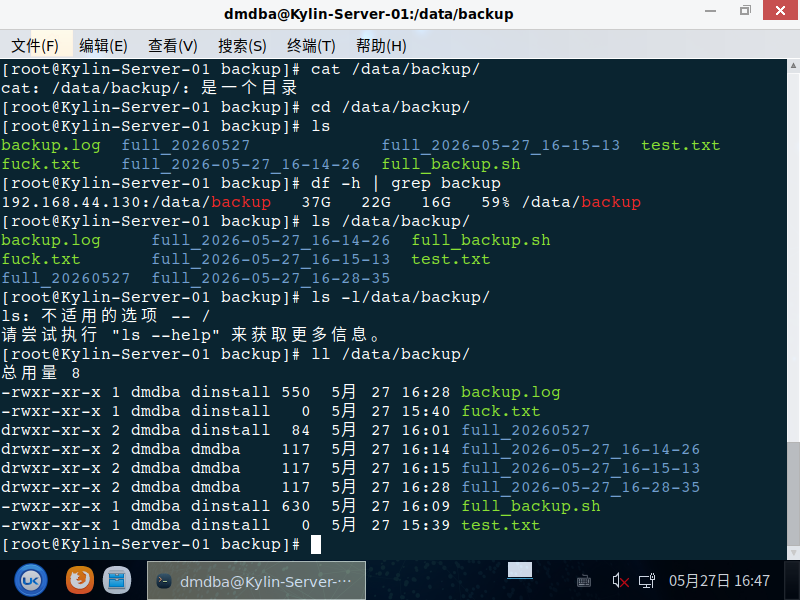
结果内容无误之后去往Server1查看NFS备份文件同步状态,一切正常,开始考虑将脚本放入自动计划
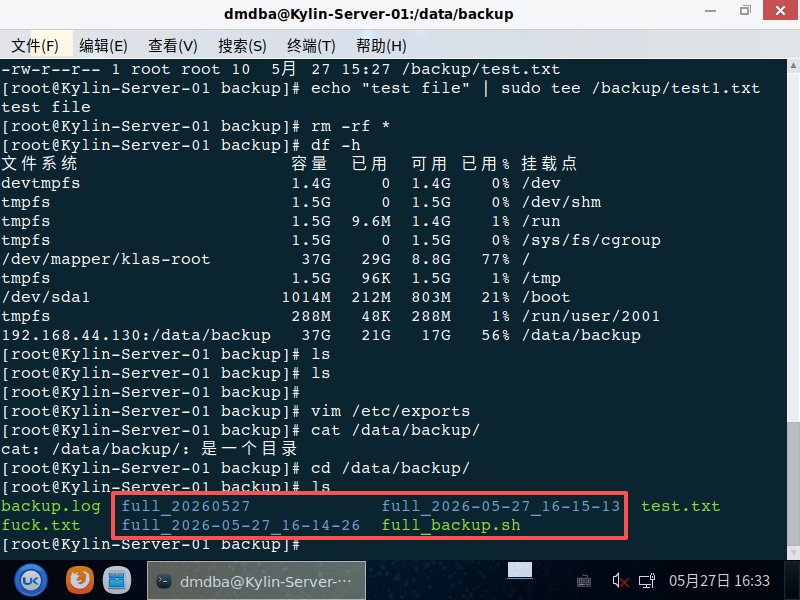
image-20260527163357344

定时任务

使用定时器Crontab,进入定时器crontab -e,添加如下规则
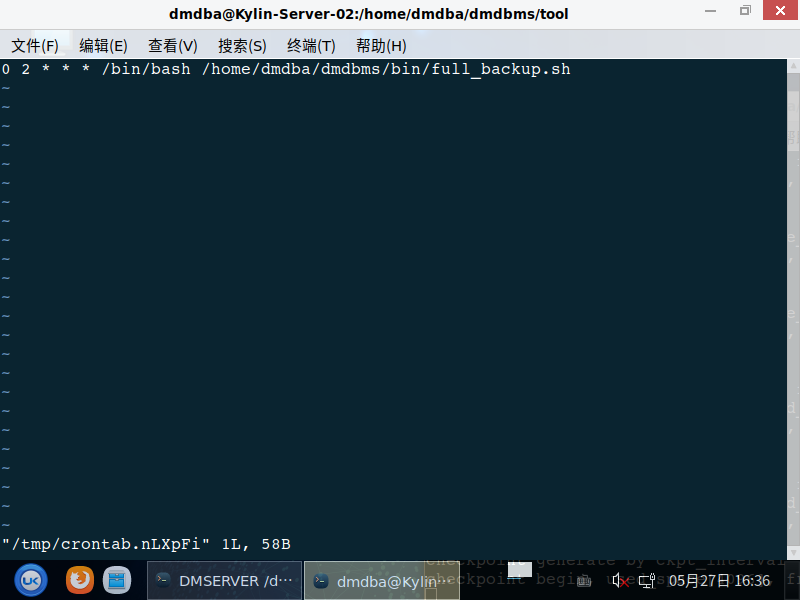
image-20260527163632503

可能有人问,为什么不用vim /etc/crontab来设置

  • crontab -e 主要是用户级定时任务
  • vim /etc/cronta 主要是系统级定时任务

收尾工作

理论上来说定为系统级定时任务更好,这里属于是笔者边做边写的,主要是还是按照个人需求来,配置完成之后设置开机自启并查看服务状态
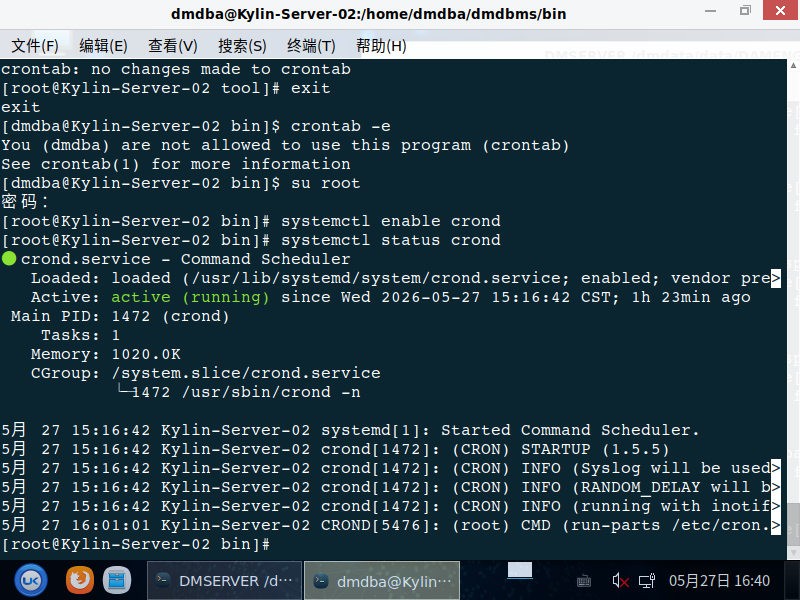
image-20260527164047759

image-20260527164826208

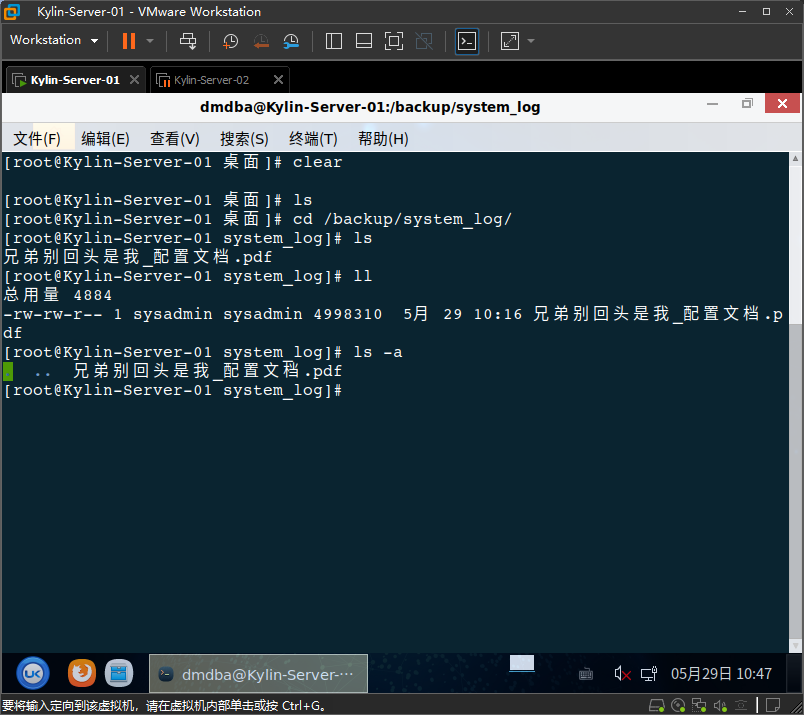
整理文档保存到/backup/system_log下

image-20260529104828131

Author: Bztiks
Link: http://bztiks.github.io/2026/05/29/2026传智杯国赛-操作系统大赛/
Copyright Notice: All articles in this blog are licensed under CC BY-NC-SA 4.0 unless stating additionally.